How to Run a Discord Giveaway (Giveaway Bot or Giveaway Tool?)
Last updated on November 16th, 2026 at 05:10 pm
There are two ways to run a Discord giveaway. A Discord giveaway bot such as GiveawayBot runs it inside your server: members click to enter and the bot picks a winner at random. A giveaway tool runs it on a giveaway page you share in Discord. It can check through Discord that entrants really joined your server, and it lets you add other ways to enter and collect an email from every entrant.
A bot is quicker for a small giveaway among existing members. A tool is better when you want to grow the server, block cheaters or reach people outside Discord. Here’s how to do both.
How to run a giveaway with a Discord giveaway bot
GiveawayBot is the best-known free bot. Setup takes a few minutes and no coding:
- Go to GiveawayBot’s website and click to invite it to your server.
- Pick your server from the list, keep the permissions it asks for, and click Authorize.
- Create a text channel for giveaways, so announcements don’t get lost in chat.
- In that channel, type /gcreate. A form asks for the duration, the number of winners and the prize. For a one-line version, type /gstart followed by the duration, the number of winners and the prize, for example /gstart 3d 1 Holiday bundle.
- Submit it. The bot posts the giveaway, and members enter by pressing its button.
- When time runs out, the bot draws a winner at random and announces them in the channel. To end a giveaway early, use /gend. If the winner doesn’t reply, use /greroll to draw again.
That’s all there is to it, which is both the strength and the limit of a bot.
Where a bot falls short
- One way to enter. Members click once. There are no bonus entries for inviting friends, following you elsewhere or joining your email list.
- Only people already in your server can enter. The giveaway doesn’t reach anyone new, so it rewards members rather than growing the server.
- Little protection against alt accounts. One person with several Discord accounts gets several chances.
- No data afterwards. You don’t get an email list or numbers on what worked.
How to run a Discord giveaway with SweepWidget
With a giveaway tool, the giveaway lives on its own page. You post the link in Discord, on your other channels and anywhere else, and people enter there.
1. Create the giveaway
Click New Sweepstakes, or open Starter Templates and choose a Discord template, which comes with server-join entry methods filled in. Add the title, dates, prize and number of winners.
2. Add the Discord action
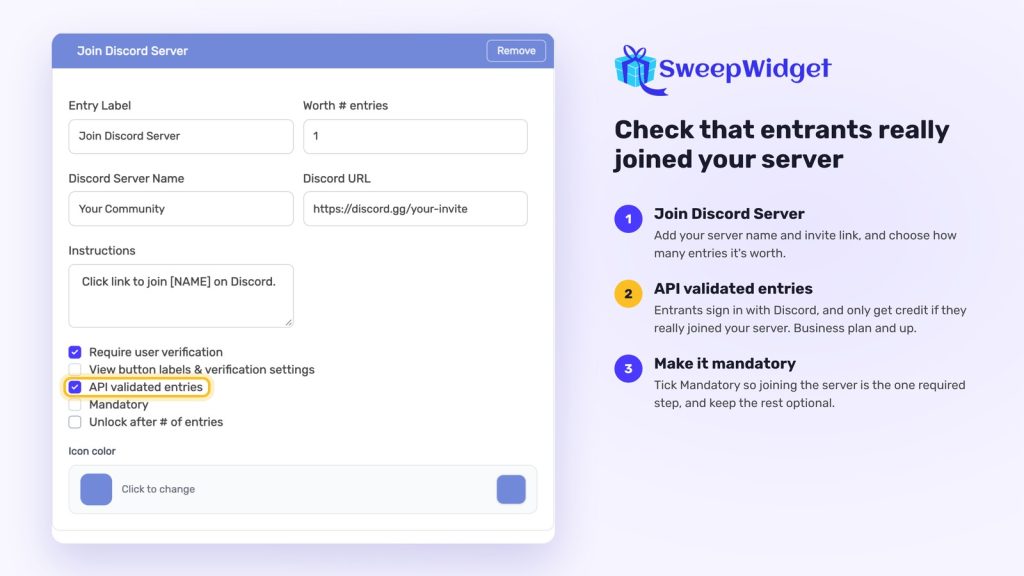
In the entry methods, click Discord and add Join Discord Server with your server name and invite link, then tick API validated entries. The Join Discord Server action and its check need the Business plan or above. Entrants then sign in with Discord, and SweepWidget only gives them credit if they actually joined your server. You can also check that an entrant has a specific role, or that they boost your server.
Entrants can also log in to the giveaway with their Discord account instead of typing their details (paid plans).
3. Add a few more ways to earn entries
This is where a giveaway tool helps you grow. Pick two to four extras:
- Refer a friend. Each entrant gets a share link. When friends enter through it, the entrant earns extra entries, and new people discover your server (Pro plan and up).
- Follow on Twitch, YouTube or X. Useful if your community also lives on a streaming or social channel.
- Join your newsletter. So you can reach people outside Discord (Pro and above).
Make the Discord join mandatory and the rest optional.
4. Turn on fraud protection
In Security Settings, choose a level: Weak, Standard, Strong or Strict. Standard and above add device fingerprinting, which makes it harder for one person to enter many times. Disposable email addresses are blocked on every giveaway, and on paid plans you can also block VPN entries.
5. Share the link in Discord
Click Save & Publish and copy the giveaway link. Post it in your announcements channel, pin it, and share it on your other socials so it reaches people who aren’t members yet.
6. Pick and announce the winner
When the giveaway ends, go to Manage Entries, click Pick A Winner and choose Randomize the Selection. You can require a minimum number of entries to be eligible.
Want to draw on stream or on a Discord Stage? Live Draw (every paid plan, from Pro) reveals the winner’s name with a countdown or spin wheel, and doesn’t show email addresses on screen. Then contact the winner and announce them in your server.
For how to check the winner and show the draw was fair, see how to pick a giveaway winner fairly.
Bot or tool: which should you use?
| Discord giveaway bot | SweepWidget | |
| Where people enter | Inside your server | A giveaway page you share in Discord and elsewhere |
| Ways to enter | One click | Discord join plus other actions, referrals and daily entries |
| Checks server membership | Only members can see it | Checked through Discord (Business and above) |
| Fraud protection | Basic | Security levels, fingerprinting, VPN and disposable-email blocking |
| Collects emails | No | Yes, from every entrant |
| Leaderboard | No | Yes, ranked by total entries (Business and above) |
| Analytics | No | Visits, conversion rate and entries per action, on all plans |
| Cost | Free | Free plan available; the Join Discord Server action needs Business |
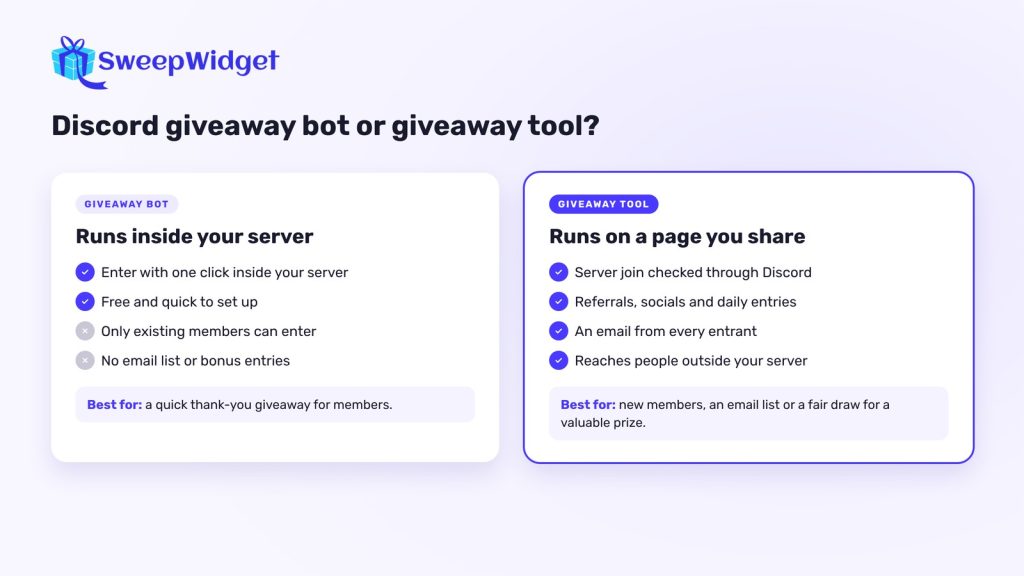
Use a bot for a quick thank-you giveaway for members. Use a tool when the goal is new members, an email list or a fair draw for a valuable prize.
Want more ideas for growing your server? Read how to get your first 1,000 Discord members.
Ready to run your first giveaway?
Start free on SweepWidget and move to Pro when you want to view and download all your entrants’ emails and get fraud controls. Or compare SweepWidget’s plans and features first.
No credit card required
FAQ
GiveawayBot is the most widely used free bot, and it covers simple giveaways well. If you need entry checks, extra entry methods or an email list, use a giveaway tool alongside or instead of a bot.
Yes. With SweepWidget’s Discord check, entrants sign in with Discord and only get credit if they’re in your server. This needs the Business plan or above.
Require the Discord check, set the security level to Standard or higher, block VPNs, and check the winner before you announce them.
With a bot, no. With a giveaway page, yes, and making “join the server” one of the actions turns the giveaway into a way to bring in new members.
A bot like GiveawayBot is free. SweepWidget has a Free plan; the Join Discord Server action and its membership check start on the Business plan.