
Contact A Winner
After picking winners, you need to contact them to arrange prize delivery. SweepWidget gives you each winner’s contact details so you can reach them yourself.
Important: Manual Contact Required
SweepWidget does not email winners when you pick them. This is true for random draws, manual picks and Live Draw.
The only winner email SweepWidget can send is for redemption-code prizes. For those, you send it yourself, one winner at a time, from the Winners page. See Sending redemption-code emails below and How to Use Redemption Codes.
For every other prize, reach out to winners yourself to:
- Notify them that they’ve won
- Collect shipping addresses or other details
- Arrange prize delivery
- Confirm their eligibility if needed
How to Access Winner Information
Step 1: Go to Manage Entries
- Go to your Dashboard
- Find the giveaway
- Click Manage Entries
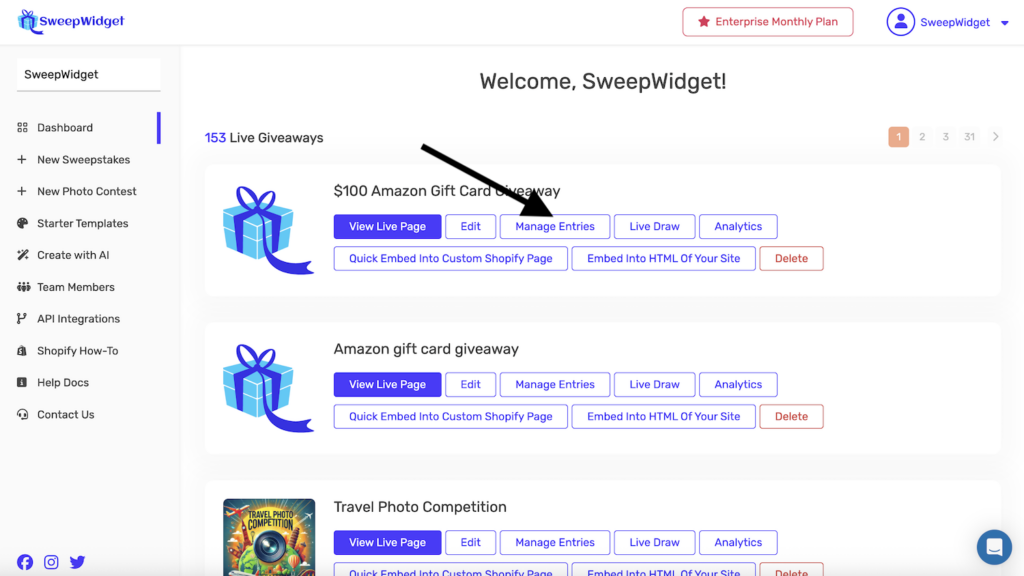
Step 2: View Winners
Click View Winners.
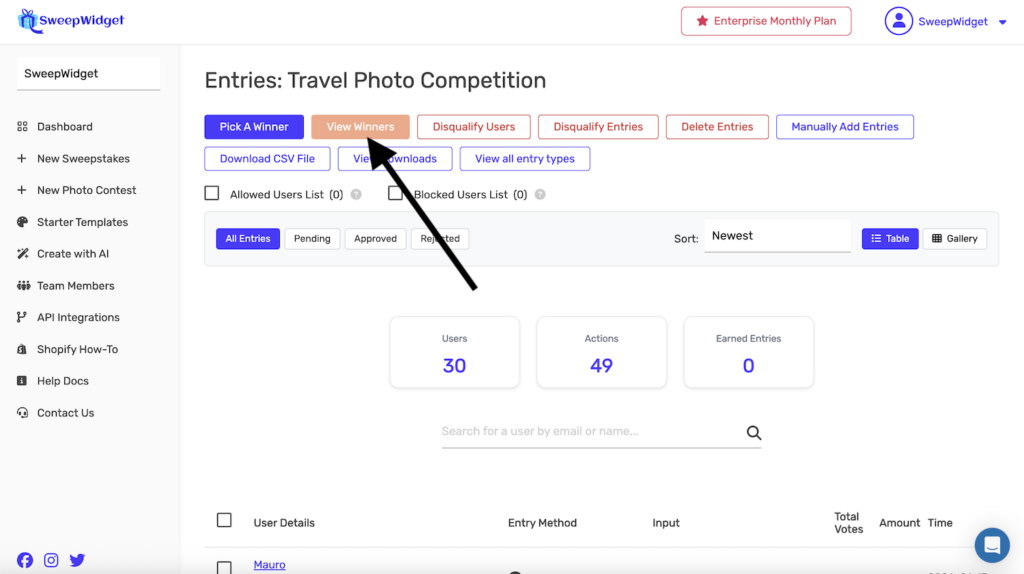
Note: you must pick winners first. See Randomly Pick A Winner.
Step 3: View Winner Contact Information
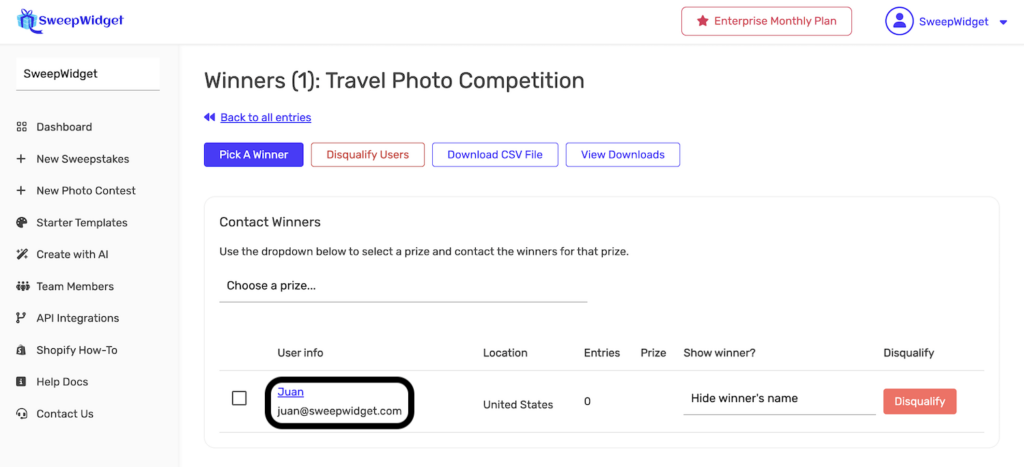
The Winners page lists every winner:
| Column | Description |
|---|---|
| User info | Winner’s name and email address. Click the name to open their entries. |
| Location | Country based on their IP address |
| Entries | Number of entries they earned |
| Prize | The prize they won |
| Show winner? | Whether and how the winner’s name is shown in the widget |
| Disqualify | Disqualify the winner |
On the Free plan, details after the first 10 users show “Upgrade To View”.
How to Contact Winners
Option 1: Email from your own inbox
- Copy the winner’s email from the User info column
- Send them an email from Gmail, Outlook or your usual tool
- Include prize details and next steps
Or click the winner’s name, then click Contact [Name] on their page. This opens a new email in your email app.
Option 2: Contact via Social Media
- Click the winner’s name to view their entries
- Find their usernames in their completed entry methods
- Send them a direct message on that platform
Option 3: Download the Winners CSV
- On the Winners page, click Download CSV File, then Download All Winners
- The file is emailed to you in 5-10 minutes and listed under View Downloads
- Use the emails and phone numbers in the file to contact all winners
Live Draw only shows winners’ names on screen, never their email addresses. Use the Winners page or the CSV to get contact details.
Sending redemption-code emails
If a prize uses redemption codes and you ticked Email winners the prize redemption instructions in the prize settings, the Winners page shows a Contact Winners section:
- Choose the prize in the Choose a prize… dropdown (only redemption-code prizes with that email set up are listed)
- Check the Email Preview and use Send Test Email to send it to yourself
- In the list of winners for that prize, click Send Email next to each winner
The Contacted column shows whether and how many times you emailed each winner. The email comes from [email protected] unless you use Custom SMTP (Enterprise).
Winner Notification Email Template
Here’s a template you can use:
Subject: Congratulations! You've Won [Prize Name]!

Hi [Winner Name],

Great news! You've been selected as a winner in our [Giveaway Name]!

Your Prize: [Prize Description]

To claim your prize, please reply to this email with:
- Your full shipping address
- Your phone number (for delivery purposes)
- [Any other required information]

Please respond within [X days] to claim your prize.

Congratulations again!

Best regards,
[Your Name/Company]
Managing Winners
From the Winners page you can also:
| Action | Description |
|---|---|
| Pick A Winner | Select more winners |
| Disqualify Users | Remove ineligible winners |
| History | See and undo deletions and disqualifications |
| Download CSV File | Export winners, users or entries |
| View Downloads | Open your exports |
| Show winner? | Choose Hide winner’s name or a display format |
Best Practices for Contacting Winners
- Contact promptly – Reach out within 24-48 hours of selecting winners
- Set a response deadline – Typically 48-72 hours
- Have a backup plan – Be ready to select an alternate
- Keep records – Document all contact attempts
- Be clear about next steps
- Verify eligibility – Age, location and other requirements
- Check spam folders – Remind winners to look in spam
What If a Winner Doesn’t Respond?
- Send a follow-up email after 24-48 hours
- Try social media if available
- After your stated deadline, disqualify them and pick a new winner
- Document your contact attempts
See How To Unpick A Winner for replacing winners.