
Contact A Winner
After picking winners for your giveaway, you’ll need to contact them to arrange prize distribution. SweepWidget provides winner contact information so you can reach out to them directly via email or social media.
Important: Manual Contact Required
SweepWidget does not automatically contact winners on your behalf. You must manually reach out to winners using their contact information to:
- Notify them that they’ve won
- Collect shipping addresses or other required information
- Arrange prize delivery or distribution
- Confirm their eligibility if needed
How to Access Winner Information
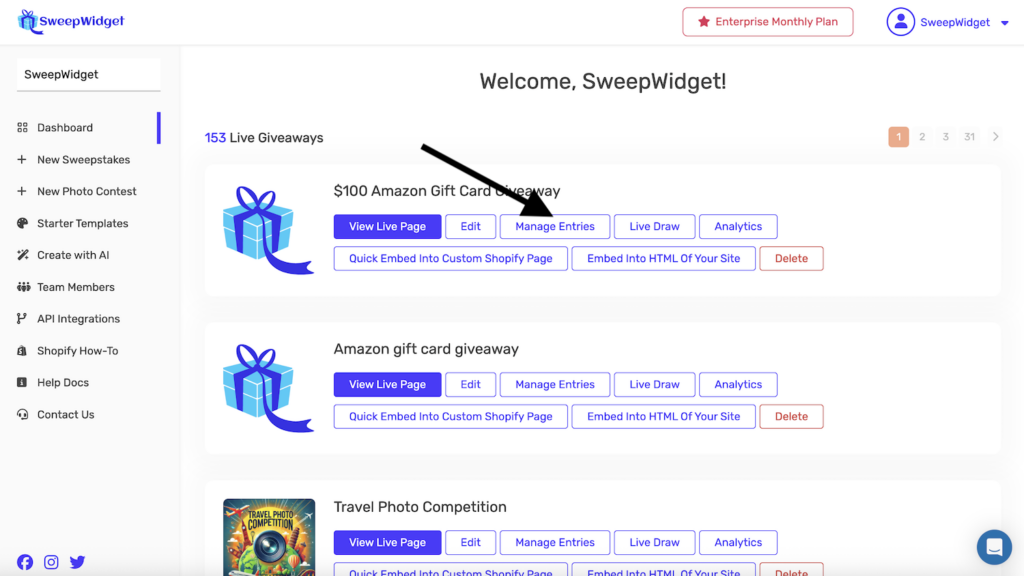
Step 1: Go to Manage Entries
- Go to your Dashboard
- Find the giveaway you want to manage
- Click the Manage Entries button
Step 2: View Winners
On the Entries page, click the View Winners button (orange) to see all selected winners.
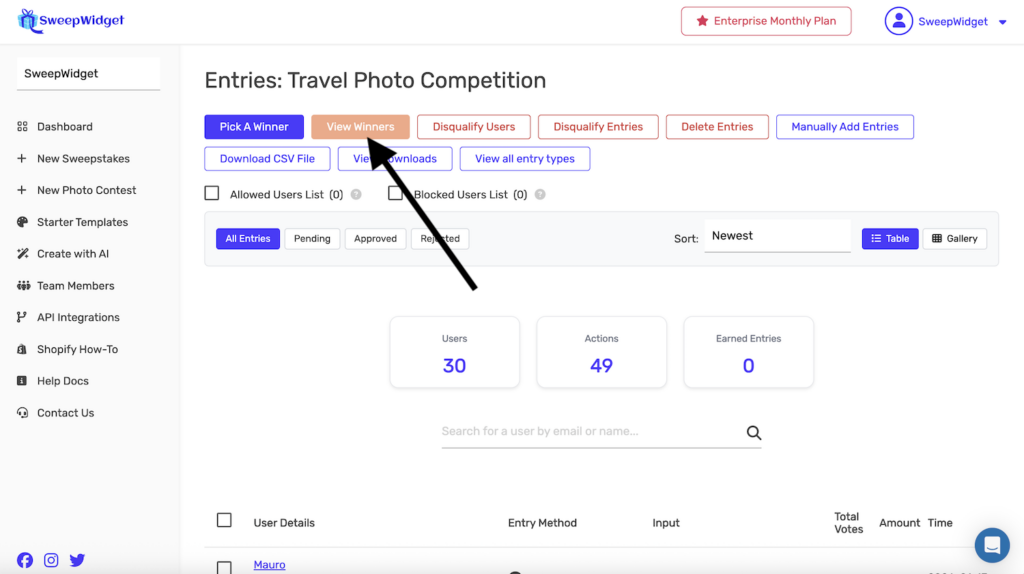
Note: You must first pick winners before this page will show any results. See How to Pick Random Contest Winners if you haven’t selected winners yet.
Step 3: View Winner Contact Information
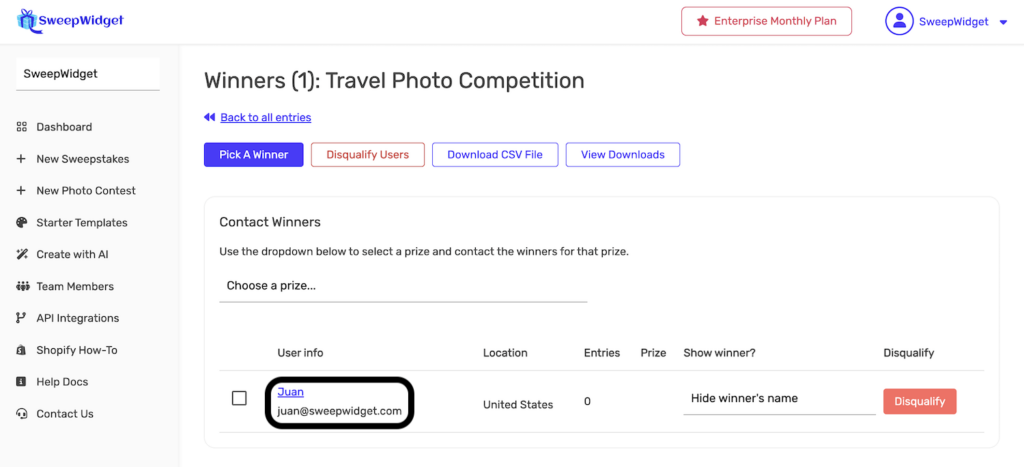
The Winners page displays all selected winners with their contact information:
Winner Information Available
For each winner, you can see:
| Field | Description |
|---|---|
| User info | Winner’s name and email address (click to view full details) |
| Location | Country/region based on their IP address |
| Entries | Number of entries they earned |
| Prize | The prize they won (if multiple prizes) |
| Show winner? | Option to show or hide winner’s name publicly |
| Disqualify | Button to disqualify the winner if needed |
How to Contact Winners
Option 1: Contact via Email
The most common method for contacting winners:
- Find the winner’s email address in the User info column
- Send them an email from your own email client (Gmail, Outlook, etc.)
- Include details about their prize and next steps
- Request any additional information needed (shipping address, size preferences, etc.)
Option 2: Contact via Social Media
If winners entered using social login or completed social entry methods:
- Click on the winner’s name to view their full entry details
- Find their social media handles from their completed entry methods
- Send them a direct message on the relevant platform (Twitter/X, Instagram, etc.)
Option 3: Download Winner CSV
For multiple winners or record-keeping:
- Click the Download CSV File button on the Winners page
- Open the CSV file in Excel, Google Sheets, or another spreadsheet application
- Use the contact information to reach out to all winners
Contact Winners by Prize
If your giveaway has multiple prizes, you can filter winners by prize:
- Find the Contact Winners section on the Winners page
- Use the Choose a prize… dropdown to select a specific prize
- View only the winners assigned to that prize
This is helpful when you need to send different information to winners of different prizes.
Winner Notification Email Template
Here’s a template you can use when contacting winners:
Subject: Congratulations! You've Won [Prize Name]!

Hi [Winner Name],

Great news! You've been selected as a winner in our [Giveaway Name]!

Your Prize: [Prize Description]

To claim your prize, please reply to this email with:
- Your full shipping address
- Your phone number (for delivery purposes)
- [Any other required information]

Please respond within [X days] to claim your prize.

Congratulations again!

Best regards,
[Your Name/Company]
Managing Winners
From the Winners page, you can also:
| Action | Description |
|---|---|
| Pick A Winner | Select additional winners if needed |
| Disqualify Users | Remove ineligible winners |
| Download CSV File | Export winner data for your records |
| View Downloads | Access previously generated CSV files |
| Hide winner’s name | Keep the winner’s identity private on the public widget |
Best Practices for Contacting Winners
- Contact promptly – Reach out within 24-48 hours of selecting winners
- Set a response deadline – Give winners a reasonable timeframe to respond (typically 48-72 hours)
- Have a backup plan – If a winner doesn’t respond, be prepared to select an alternate
- Keep records – Document all communication attempts for your records
- Be clear about next steps – Explain exactly what information you need from them
- Verify eligibility – Confirm winners meet any age, location, or other requirements
- Check spam folders – If a winner doesn’t respond, remind them to check spam
What If a Winner Doesn’t Respond?
If a winner doesn’t respond to your contact attempts:
- Send a follow-up email after 24-48 hours
- Try contacting them through social media if available
- After your stated deadline, you can disqualify them and select a new winner
- Document your contact attempts in case of disputes
See How to Unpick or Disqualify a Winner for instructions on selecting replacement winners.