
Disallow Entries Using A VPN
A virtual private network (VPN) is a tool that allows internet users to hide their identity (with some limitations). It creates a proxied IP address to mask their true identity. It can make it look like they’re in another country when they actually aren’t.
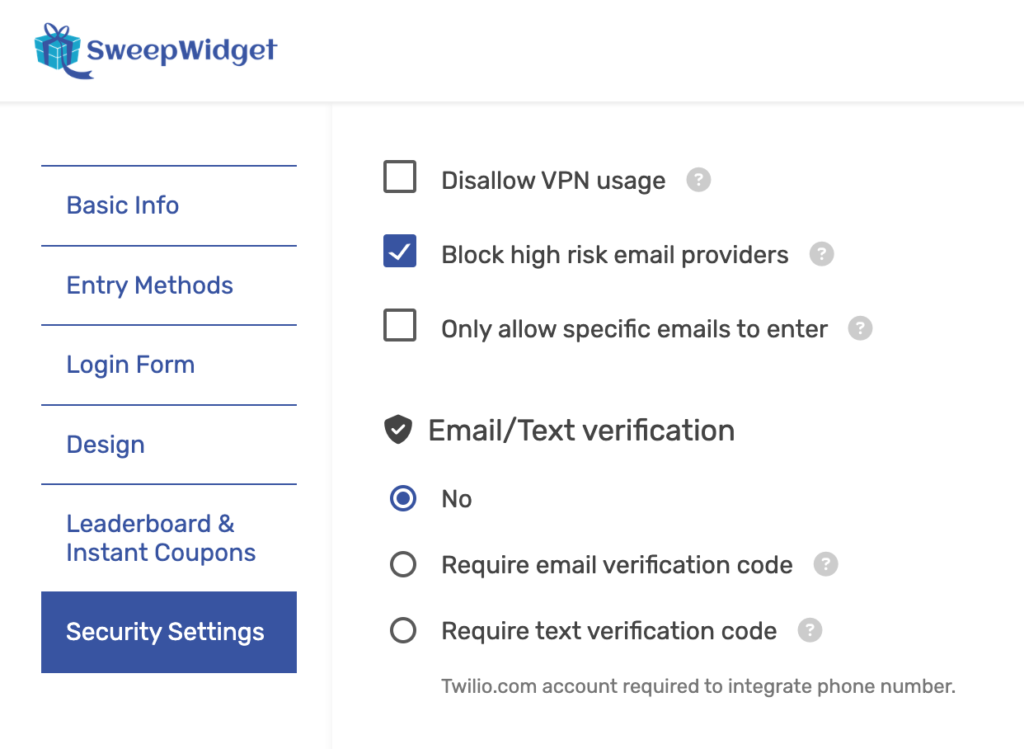
While this can be a good thing for privacy advocates, it can also be used maliciously for people to try and cheat at contests. Therefore, SweepWidget provides you the option to allow or disallow VPN usage. You need to navigate to Security Settings. Then click on Disallow VPN Usage or leave it blank to allow VPN Usage.
What Gets Detected
When VPN blocking is enabled, SweepWidget checks for the following types of connections:
- VPN connections – Commercial VPN services (NordVPN, ExpressVPN, etc.)
- Proxy servers – HTTP/SOCKS proxies used to mask IP addresses
- Tor exit nodes – Traffic routed through the Tor anonymity network
- Known abusive IPs – IP addresses with a history of fraudulent activity
- Bot traffic – Automated tools and scripts
How It Works
SweepWidget uses third-party IP intelligence services to analyze each visitor’s connection in real-time. When a user attempts to enter your giveaway, their IP address is checked against databases of known VPN providers, proxy servers, and Tor exit nodes. If a match is found, the entry is blocked and the user is shown an error message.
Recommendation
We strongly recommend enabling VPN blocking for all contests, especially those with valuable prizes. VPN users can bypass geo-restrictions and IP-based duplicate detection, making it easier to submit fraudulent entries. Combining VPN blocking with the Strong or Strict security level provides the best protection against fraud.