
Geo-Targeting: Restrict Entries by Country and State
Geo-targeting lets you control which countries (and even states/provinces) can enter your giveaway. You can either allow only specific locations or block specific locations from entering. This is essential for legal compliance, shipping limitations, or region-specific promotions.
Why Use Geo-Targeting
- Legal requirements – Some countries have strict giveaway/sweepstakes laws
- Shipping limitations – Physical prizes can only be shipped to certain regions
- Regional promotions – Target specific markets for localized campaigns
- Sponsor requirements – Sponsors may require geographic restrictions
- Currency/payment limitations – Gift cards or vouchers may only work in certain countries
- State-level compliance – Some US states, Canadian provinces, or other regions have specific contest laws
How to Set Up Geo-Targeting
Step 1: Go to Security Settings
- Create or edit a giveaway
- Click on the Security Settings tab in the left sidebar
Step 2: Enable Geo-Targeting
Check the box labeled “Enable geo-targeting”.
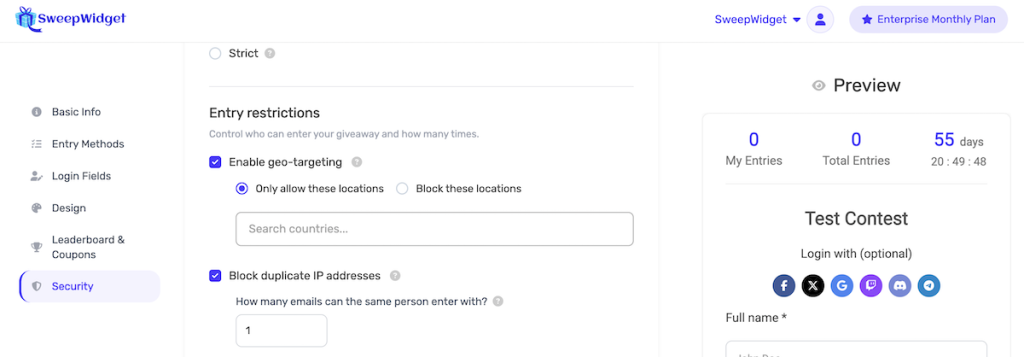
Step 3: Choose Allow or Block Mode
Select one of the two modes:
- Only allow these locations – Only participants from the countries you select can enter. Everyone else is blocked.
- Block these locations – Everyone can enter except participants from the countries you select.
| Mode | Use Case |
|---|---|
| Only allow | You know exactly which countries should be eligible (e.g., US-only sweepstakes) |
| Block | You want to run a worldwide giveaway but need to exclude specific countries for legal reasons |
Step 4: Select Countries
Use the search field to find and select countries:
- Type a country name in the “Search countries…” field
- Click a country from the dropdown to add it
- Selected countries appear as blue pill badges above the search field
- Click the x on any pill to remove that country
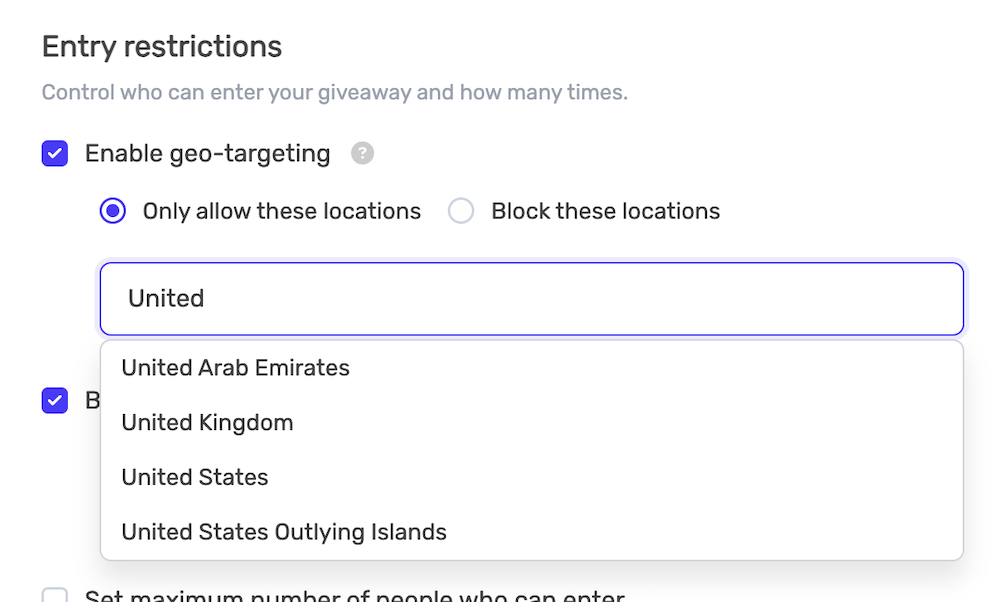
You can add as many countries as you need. The full list includes all 249 internationally recognized countries and territories.
Step 5: Select States/Provinces (Optional)
For supported countries, you can restrict entries down to the state or province level. When you select one of the following countries, a state/province section automatically appears below with checkboxes:
| Country | Regions Available |
|---|---|
| United States | 50 states + District of Columbia |
| Canada | 13 provinces and territories |
| United Kingdom | 4 nations (England, Northern Ireland, Scotland, Wales) |
| Australia | 8 states and territories |
| Brazil | 27 states |
| India | 36 states and union territories |
| Germany | 16 federal states |
By default, all states/provinces are selected when you add a supported country. To restrict to specific states:
- Uncheck the “All” checkbox next to the country name
- Select only the states/provinces you want to include (or exclude, depending on your mode)
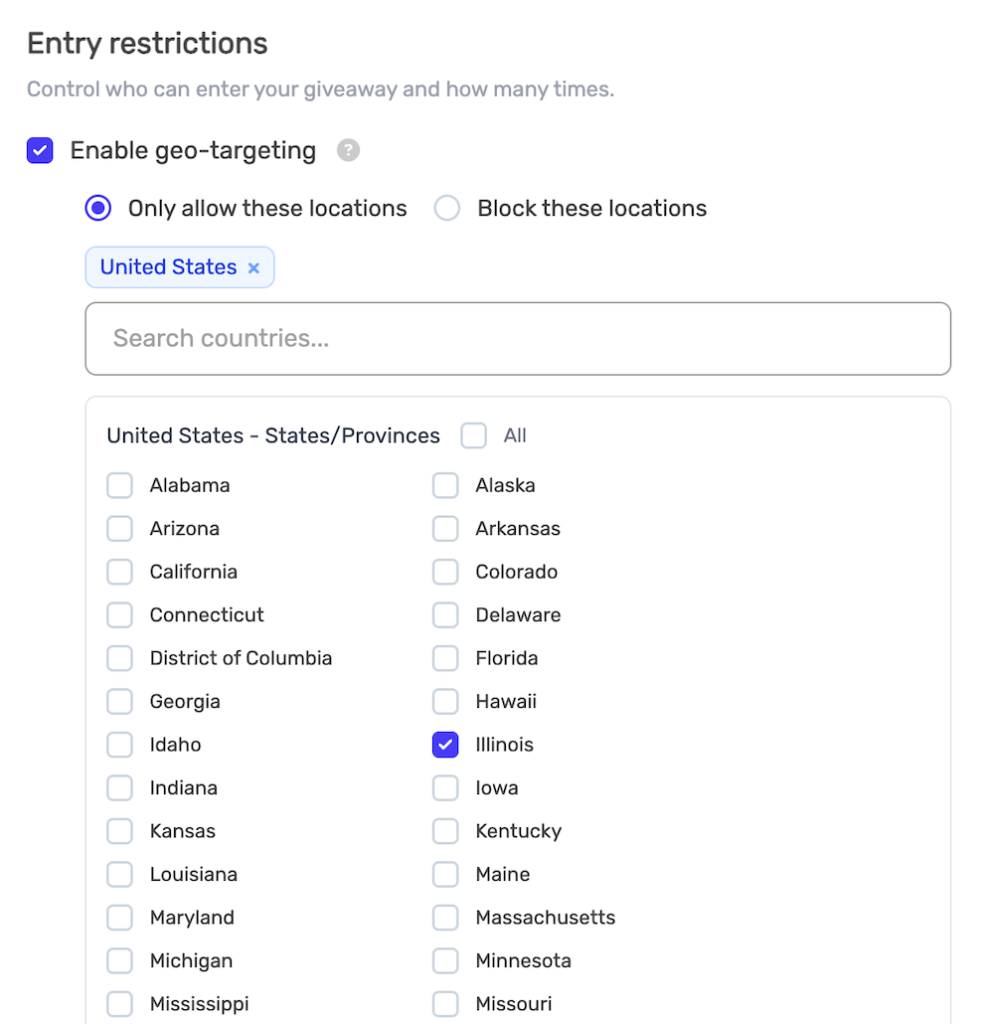
For countries not in the list above, geo-targeting works at the country level only.
Step 6: Save Your Changes
Click Save & Publish to apply the geo-targeting restrictions.
What Blocked Users See
When someone from a restricted location visits your giveaway, they see the message:
“This location is not allowed to enter.”
The giveaway details (title, description, countdown, prize info) are still visible, but the entry form and entry methods are hidden.
How Geo-Targeting Works
| Aspect | Details |
|---|---|
| Detection method | IP-based geolocation via Cloudflare |
| Country accuracy | Highly accurate at the country level |
| State/province accuracy | Generally accurate, but may vary in some regions |
| Enforcement | Both client-side (widget) and server-side (login and entry submission) |
| VPN users | May appear from a different location. Combine with “Block VPNs” for stronger enforcement. |
SweepWidget enforces geo-targeting at multiple points:
- Widget load – The giveaway widget checks the visitor’s location when it loads and hides the entry form if they are restricted.
- Login/entry submission – The server verifies the user’s location again when they attempt to log in or submit an entry. This prevents bypassing the client-side check.
For state-level restrictions, if the visitor’s state cannot be determined, the system falls back to country-level enforcement only. This means the country restriction is always enforced, but state-level checks are skipped if region data is unavailable.
Common Country Combinations
| Region | Countries |
|---|---|
| North America | United States, Canada, Mexico |
| English-speaking | United States, Canada, United Kingdom, Australia, New Zealand, Ireland |
| European Union | Germany, France, Italy, Spain, Netherlands, Belgium, Austria, Portugal, Greece, Poland (and others) |
| Scandinavia | Sweden, Norway, Denmark, Finland |
| DACH region | Germany, Austria, Switzerland |
| Latin America | Mexico, Brazil, Argentina, Colombia, Chile, Peru |
| Asia Pacific | Australia, New Zealand, Japan, South Korea, Singapore |
Use Cases
| Scenario | Mode | Configuration |
|---|---|---|
| US-only sweepstakes | Allow | Allow United States only |
| US sweepstakes excluding void states | Allow | Allow United States, then uncheck void states (e.g., New York, Florida) |
| Worldwide except restricted countries | Block | Block countries with strict contest laws (e.g., Belgium, Italy) |
| Canada excluding Quebec | Allow | Allow Canada, then uncheck Quebec in the province list |
| UK product launch | Allow | Allow United Kingdom only |
| Physical prize shipping | Allow | Allow only countries you can affordably ship to |
| Service availability | Allow | Allow only countries where your service operates |
Legal Considerations
Some countries and regions have strict laws regarding giveaways and sweepstakes:
- Quebec, Canada – Requires registration and fees for contests over certain values. You can now exclude Quebec specifically using state-level targeting.
- Belgium – Has restrictions on promotional contests
- Italy – Requires government notification for certain promotions
- Brazil – Requires authorization from SECAP for sweepstakes
- Certain US states – Some states (e.g., New York, Florida, Rhode Island) have additional registration or bonding requirements for high-value sweepstakes. You can exclude specific states using state-level targeting.
Note: Always consult with a legal professional to ensure your giveaway complies with local laws in your target regions.
Combining with Other Security Settings
Geo-targeting works best when combined with other security features:
| Setting | Why Combine |
|---|---|
| Block VPNs | Prevents users from bypassing geo-restrictions with a VPN |
| Anti-spam settings | Adds device fingerprinting on top of location checks |
| Email verification | Adds an extra layer of identity verification |
| Block disposable emails | Prevents temporary email abuse from any location |
Best Practices
- Clearly state eligibility – Mention country and state restrictions in your giveaway rules
- Use Block mode for few exclusions – If you only need to exclude 1-2 countries, Block mode is simpler than listing every allowed country
- Test from restricted regions – Use a VPN to verify the blocking message appears correctly
- Consider your audience – Only restrict if legally or logistically necessary
- Enable Block VPNs – For stronger enforcement, enable VPN blocking alongside geo-targeting
- Use state-level targeting for compliance – Exclude specific states like Quebec or New York instead of blocking the entire country
Troubleshooting
Users from allowed locations being blocked
- The user may be using a VPN that shows a different location
- Their ISP may route traffic through a server in a different country
- For state-level restrictions, the region detection may occasionally be inaccurate. Consider allowing the entire country if state-level accuracy is a concern.
Users from restricted locations getting through
- They may be using a VPN to appear from an allowed location. Enable Block VPNs to mitigate this.
- Server-side enforcement catches most bypass attempts, but VPN traffic can still mask the true location.
Plan Requirements
Geo-targeting is available on Premium and Enterprise plans. On lower plans, the geo-targeting option will show a “Premium” badge indicating an upgrade is needed.
Notes
- Geo-targeting is enforced both when the widget loads and on the server when a user logs in or submits an entry
- Users with VPNs may bypass geographic restrictions. Combine with VPN blocking for best results.
- You can change geo-targeting settings at any time, even after the giveaway starts
- State/province targeting is available for 7 countries (US, CA, UK, AU, BR, IN, DE). For all other countries, targeting is at the country level.
- If a user’s state cannot be determined, the system will still enforce the country-level restriction