How to Run an Instant Win Game Online
An instant win game is a giveaway where each entrant finds out straight away whether they’ve won, instead of waiting for a draw at the end. You decide the prizes and the odds in advance (say, a 1 in 10 chance of a discount code), and the game reveals the result the moment someone enters.
That instant answer is the appeal. People get a small thrill now, winners get their prize while they’re still on your site, and you can still run a grand prize draw at the end for everyone.
How do instant win games work?
Every instant win game has the same three parts:
- A prize pool. A fixed number of prizes, often discount codes, gift cards or small products.
- A way to decide who wins. Usually set odds (each entrant has a 1 in 20 chance), sometimes “everyone wins something”.
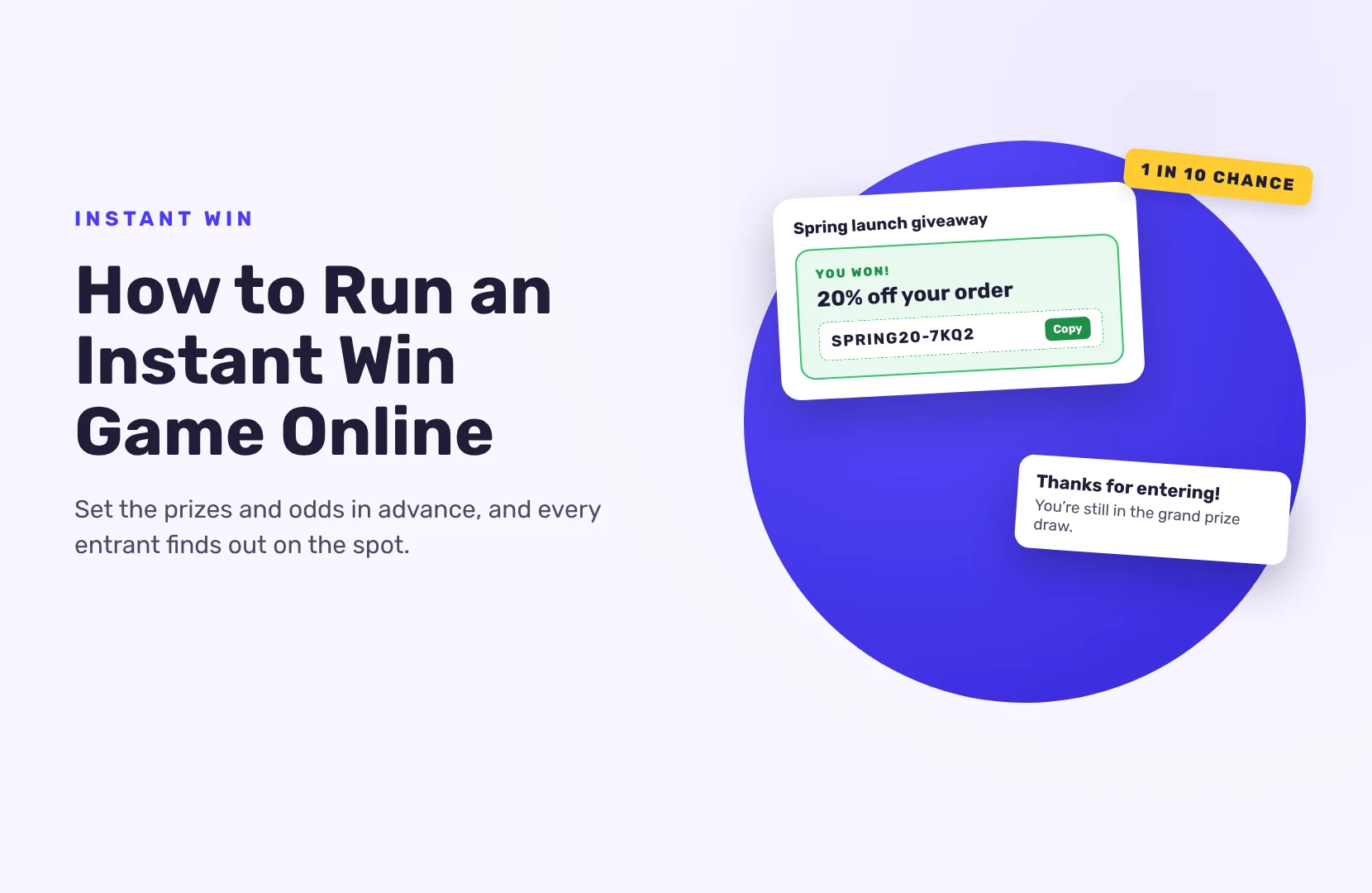
- A reveal. A spin of a wheel, a scratch card, a box to open, or simply a “You won!” message. In SweepWidget, the result appears as a card inside the giveaway: a prize card with a code, or a thank-you message. If you want a spin wheel, see when a spin wheel draw is fair.
When the prizes run out, the game is over, or entrants can only win the grand prize from then on.
Instant win or a regular sweepstakes?
- When people find out: right away in an instant win game; after it ends in a sweepstakes draw.
- Number of winners: many small prizes, versus usually a few.
- Best for: coupons, store traffic and events, versus one big prize.
- Work after it ends: little, versus drawing, checking and contacting winners.
Many brands combine them: an instant win for small prizes, and a random draw for a big one at the end.
When does an instant win game make sense?
- E-commerce: a chance to win a discount right away gets people shopping while they’re on your site.
- Product launches: give away a few free units instantly to get them into people’s hands.
- In-store and events: a QR code on a poster or booth leads to the game; people see the result on their phone.
- Holiday promotions: “everyone wins” coupons with a grand prize on top.
How to run an instant win game online
1. Set the prize pool and budget
Decide how many prizes you can afford. For codes, have them ready: one unique code per prize, or one shared code if everyone can use the same one. Each giveaway holds up to 5,000 unique codes on Business, 10,000 on Premium and 15,000 on Enterprise.
2. Work out the odds
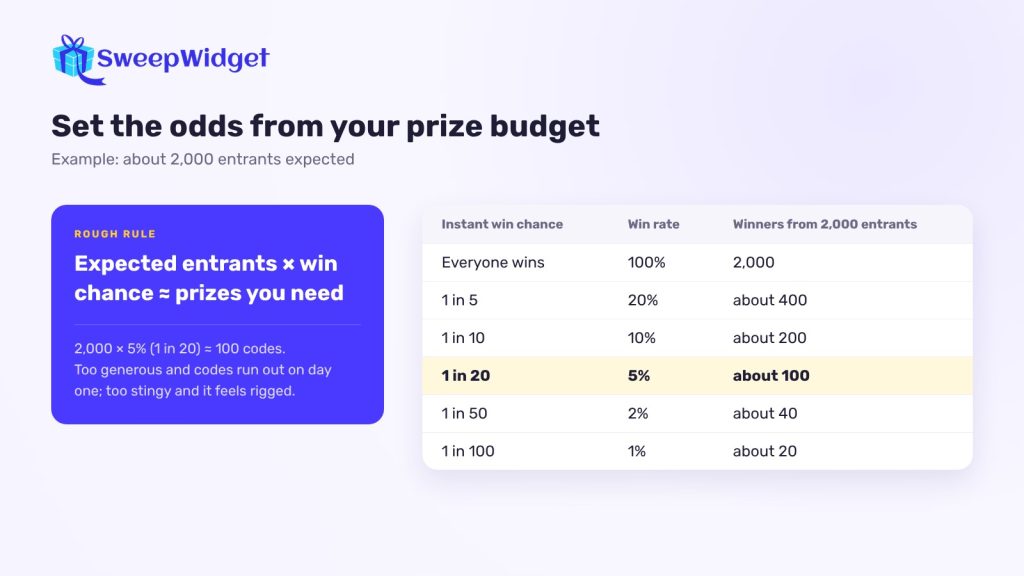
Use your expected number of entrants. If you expect about 2,000 people and have 100 codes, a 1 in 20 chance (5%) gives roughly 100 winners. Set the odds too high and the codes run out on day one. Too low and almost nobody wins, which feels rigged.
When in doubt, start with lower odds and more codes. And say in your rules what happens when the prizes run out.
3. Set it up in SweepWidget
Instant win is part of SweepWidget’s rewards feature, on the Business plan and above.
- Create or edit a giveaway and open the Leaderboard, Milestones, & Instant Coupons tab.
- Tick Add locked prizes, tiered rewards, or instant coupon codes.
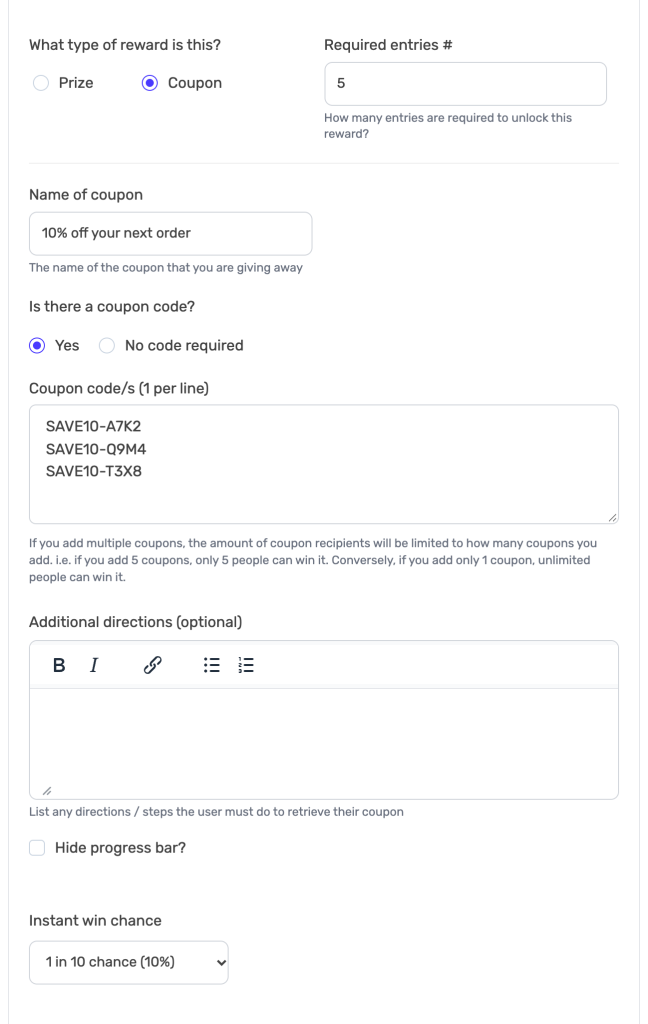
- Add a reward and choose Prize or Coupon.
- Set Entries required. Use 1 to run the game as soon as someone enters. Use a higher number if you want people to complete a few actions first.
- For coupons, add your codes, one per line.
- Under Instant win chance, choose the odds: Everyone wins, a chance from 1 in 2 (50%) down to 1 in 100 (1%), or a Custom percentage.
- Optional: send winners their code by email. The default email is on Business; a custom email with your logo needs Premium.
- Save the giveaway.
4. Know what entrants see
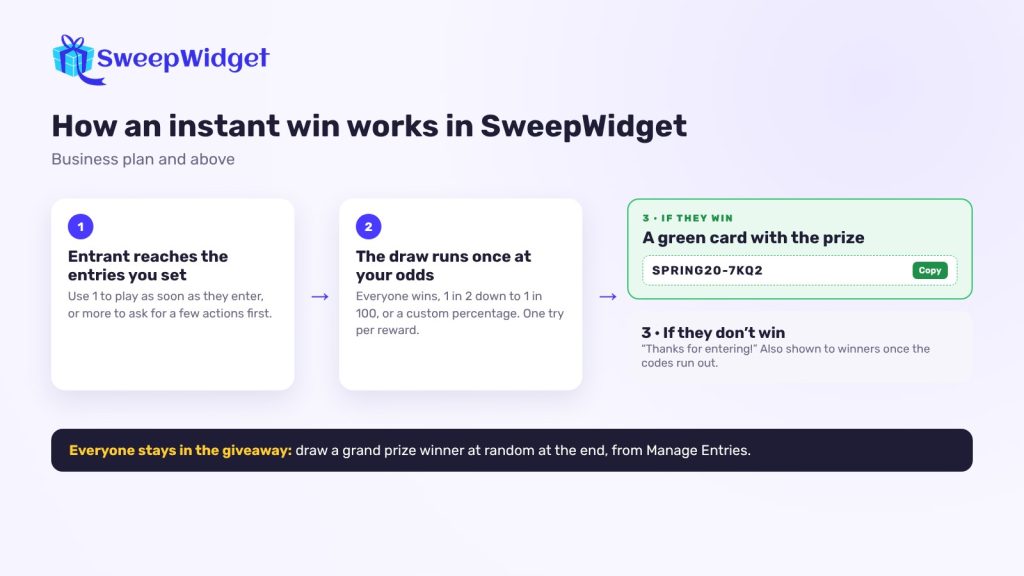
When someone reaches the entries you set, the game runs once:
- Winners see a green congratulations card with the prize name and a code they can copy.
- Everyone else sees a “Thanks for entering!” message.
- If the codes have run out, winners of the draw see the “didn’t win” message instead.
Each entrant gets one try per reward. To give people more chances, add more rewards at higher entry counts (for example at 1, 5 and 10 entries). That also encourages them to complete more actions.
5. Add a grand prize
Entrants who don’t win instantly stay in the giveaway. At the end, pick a grand prize winner at random from all entries in Manage Entries. Everyone who played has a second reason to stay engaged. See how to pick a giveaway winner fairly.
6. Protect the prizes
Instant prizes are handed out on the spot, so fake entries cost you real codes. Before you launch:
- Keep security at Standard or higher. Device fingerprinting from Standard up helps catch bots and repeat entries.
- Block VPNs in the security settings.
- Rely on disposable-email blocking, which is on for every giveaway.
- On Enterprise, require email verification with a code, so each entry has a real inbox behind it.
7. Write clear rules
An instant win game is a type of sweepstakes, so publish official rules. Say how many prizes there are, what they’re worth, the odds, the dates, who can enter and what happens when prizes run out. If any action involves a purchase, keep a free way to enter. Word the odds the way you set them, for example “a 1 in 20 chance of winning a 20% off code, while codes last”. More on free entry in our guide to alternative methods of entry.
8. Promote it and track the winners
Share the giveaway link on social media, in emails and on your site, and use the QR code on posters, packaging or at your booth.
Winners are listed under User Earned Coupons in Manage Entries, and you can export them as a CSV. Check which codes were redeemed in your store to see how many turned into orders.
Ideas for your first instant win game
- Launch-day discount: 1 in 5 chance of 20% off, with a grand prize of the new product.
- Everyone wins: every entrant gets 10% off, with a 1 in 50 chance of a free order.
- Booth game: visitors scan a QR code at your stand, with a 1 in 10 chance of a free sample.
Instant win is one of several formats you can run. See how photo and voting contests work.
FAQ
Yes, if the odds are set in advance, applied the same way to everyone, and stated in your rules. Each entrant gets the same chance.
It depends on your budget and prizes. Small prizes like discount codes can have high odds (1 in 5 or even everyone wins); valuable ones should be rarer.
Yes. Choose “Everyone wins” and every entrant who reaches the threshold sees a congratulations card with their code.
New winners of the draw see the “didn’t win” message. Say in your rules that prizes are limited, and keep a grand prize draw so the giveaway is still worth entering.
Not with SweepWidget. Instant win is built into the giveaway’s rewards settings on Business and above, alongside the regular random draw.