Giveaway Landing Page: What to Include (and What to Leave Out)
A giveaway landing page needs six things above the fold: the prize in the headline, a photo of it, who’s running the giveaway, how to enter, when it ends and how many people will win. Below that, add the full rules, a free way to enter and a clear next step after someone enters. Leave out everything else, because every extra link is a way off the page.
The page has one job: turn a visitor into an entrant. Here’s what to put on it, in order.
What should a giveaway landing page include?
1. A headline that names the prize
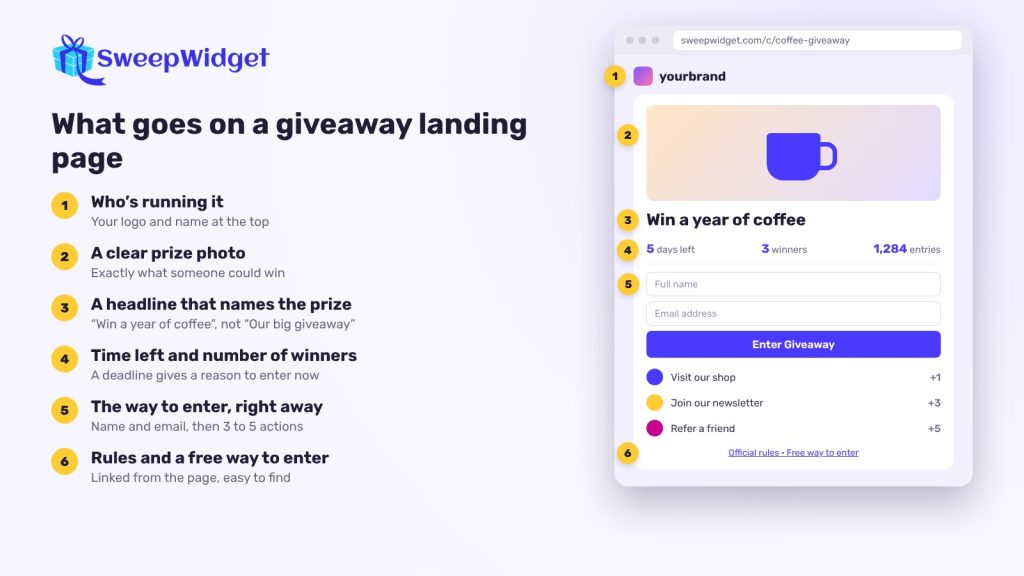
“Win a year of coffee” beats “Our big holiday giveaway”. People decide in a few seconds whether a prize is worth their email, so put the prize in the title in plain words. If there are several winners, say so (“10 winners”).
2. A clear photo or video of the prize
Show exactly what someone could win. A product photo on a plain background works better than a lifestyle shot where the prize is hard to spot. In SweepWidget you add this in the Design tab under “Do you want to feature a photo or video?”: upload an image or embed a YouTube video, then choose how it displays.
3. Who’s running it
People are more careful with giveaways than they used to be, and fair enough. Your logo and name at the top tell them it’s real. On SweepWidget’s hosted page, the custom logo sits above the giveaway, and you can link it to your website. Upload it at the size you want it shown, because it isn’t resized for you.
4. The ways to enter, right away
Don’t make people scroll to find the entry form. The first step should be visible as soon as the page loads, and it should be short: name and email, then the actions that earn extra entries.
Three to five actions is plenty. Make one or two of them required and the rest optional. A long list of required steps is the most common reason people leave halfway.
5. The end date and a countdown
A deadline gives people a reason to enter now rather than “later” (which usually means never). SweepWidget’s widget shows the time left, alongside the entrant’s own entries and the total. If a low total count might put people off early on, you can hide “My Entries”, “Total Entries” or both in the Design tab.
6. How many winners, and how they’re picked
One line is enough: “One winner, drawn at random on December 15 from all entries.” If you’re giving away several prizes, list them in the prizes section, each with its number of winners.
7. Rules, and a free way to enter
Link to your full official rules from the page. They should cover who can enter, the dates, the prize and its value, how the winner is chosen and how they’ll be contacted. In SweepWidget, open Basic Info and click Update terms and conditions. You can paste your own rules or use the generator, which fills a template from your details. You still need to check the result against the rules where you and your entrants live.
If any entry action involves a purchase, make the free way to enter easy to find on the page itself, not only in the fine print.
8. A reason to share
A referral link turns each entrant into a promoter: they earn extra entries when a friend enters through their link. Put it where people see it right after they enter. Referral links are on the Pro plan and above. More in how to grow your email list with a referral giveaway.
9. A next step after entering
Once someone has entered, they’re warm. Send them somewhere useful: a product page, a discount, a blog post. SweepWidget can redirect entrants to any URL once they’ve finished every entry action, after a short countdown. Two things to know:
- It doesn’t work if the giveaway has a Refer-A-Friend action, because referrals never “finish”.
- Add UTM tags to the URL so the traffic shows up as giveaway traffic in your analytics.
10. Your brand look, kept simple
Match your colors, but don’t decorate the page to death. On the hosted page you can set a background color or a background image (one or the other), plus widget colors and fonts. On Premium and above you can also add custom CSS and remove SweepWidget’s branding.
What should you leave off the page?
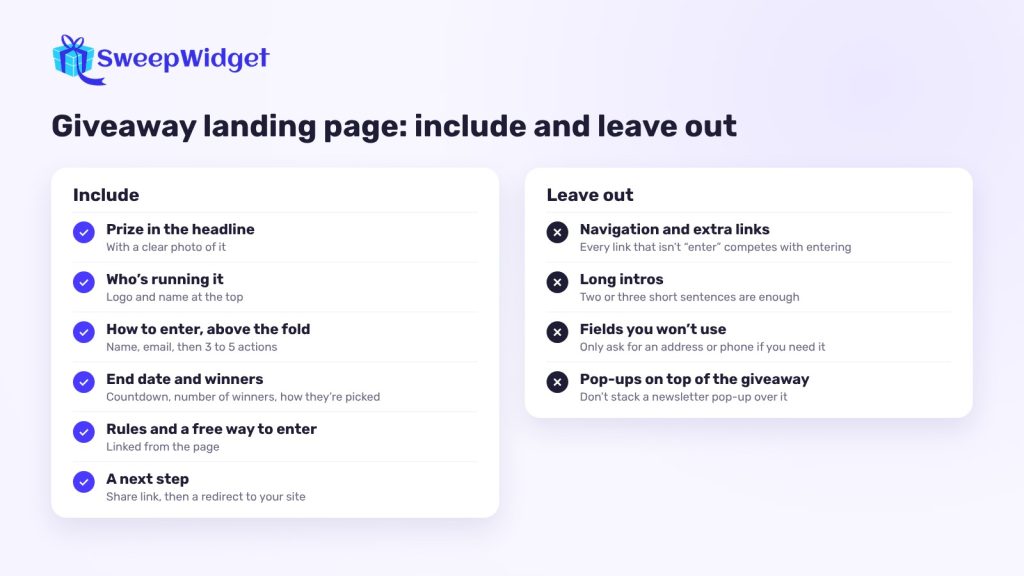
- Navigation and extra links. The giveaway page isn’t your homepage. Every link that isn’t “enter” or “rules” competes with entering.
- Long intros. Two or three short sentences about the prize and why you’re giving it away are enough.
- Fields you won’t use. Every entrant gives a name and email. Only ask for an address, phone number or birthday if you need it.
- Pop-ups on top of the giveaway. If the giveaway itself is a pop-up on your site, don’t stack a newsletter pop-up over it.
Hosted page or your own website?
You don’t need to build anything. Every SweepWidget giveaway gets a free hosted landing page with a shareable link, which is the quickest option and works well for social media, where you only need one link.
Embedding the giveaway on your own site keeps visitors on your domain. Paste the embed code into any page, or turn the giveaway into a pop-up that opens a few seconds after the page loads. On Shopify, quick-embed creates a store page with the giveaway already on it.
Many brands do both: embed it on the site and share the hosted link on social.
Make the link easy to share
- A custom URL. On Premium and above, change the random link to something readable, like sweepwidget.com/c/summer-giveaway. It has to be unique, and if you change it later the old custom link stops working. The original default link keeps working.
- A QR code. Tick “Get a sharable QR code” on the publish page and download it for posters, packaging, receipts or an event booth. Test it on a couple of phones before you print, and print the link next to it.
How do you know the page is working?
Open the giveaway’s Analytics tab. The conversion rate shows what share of unique visitors entered. If lots of people visit and few enter, the prize or the first step is the problem, not your promotion. The Entry Methods tab shows which actions people actually complete, so you can drop the ones nobody does. For ways to raise the number of entries without attracting fake ones, see how to get more giveaway entries.
You can edit a giveaway while it’s running, so fix what isn’t working rather than waiting for the next one.
If your giveaway rewards purchases, make sure the free way to enter is clear before you launch. Read how an alternative method of entry works.
FAQ
No. Every SweepWidget giveaway comes with a free hosted landing page and a link you can share anywhere. You can embed it on your site later if you want to.
The prize, stated plainly in the headline with a clear photo. If the prize doesn’t appeal, no layout will fix it.
Three to five usually works. Keep one or two required and make the rest optional, so people can enter quickly and earn more if they want to.
Link to the full rules from the page, and put the short version (dates, who can enter, how winners are picked) where people can see it without clicking.