How to Measure Giveaway ROI (With a Simple Formula and Example)
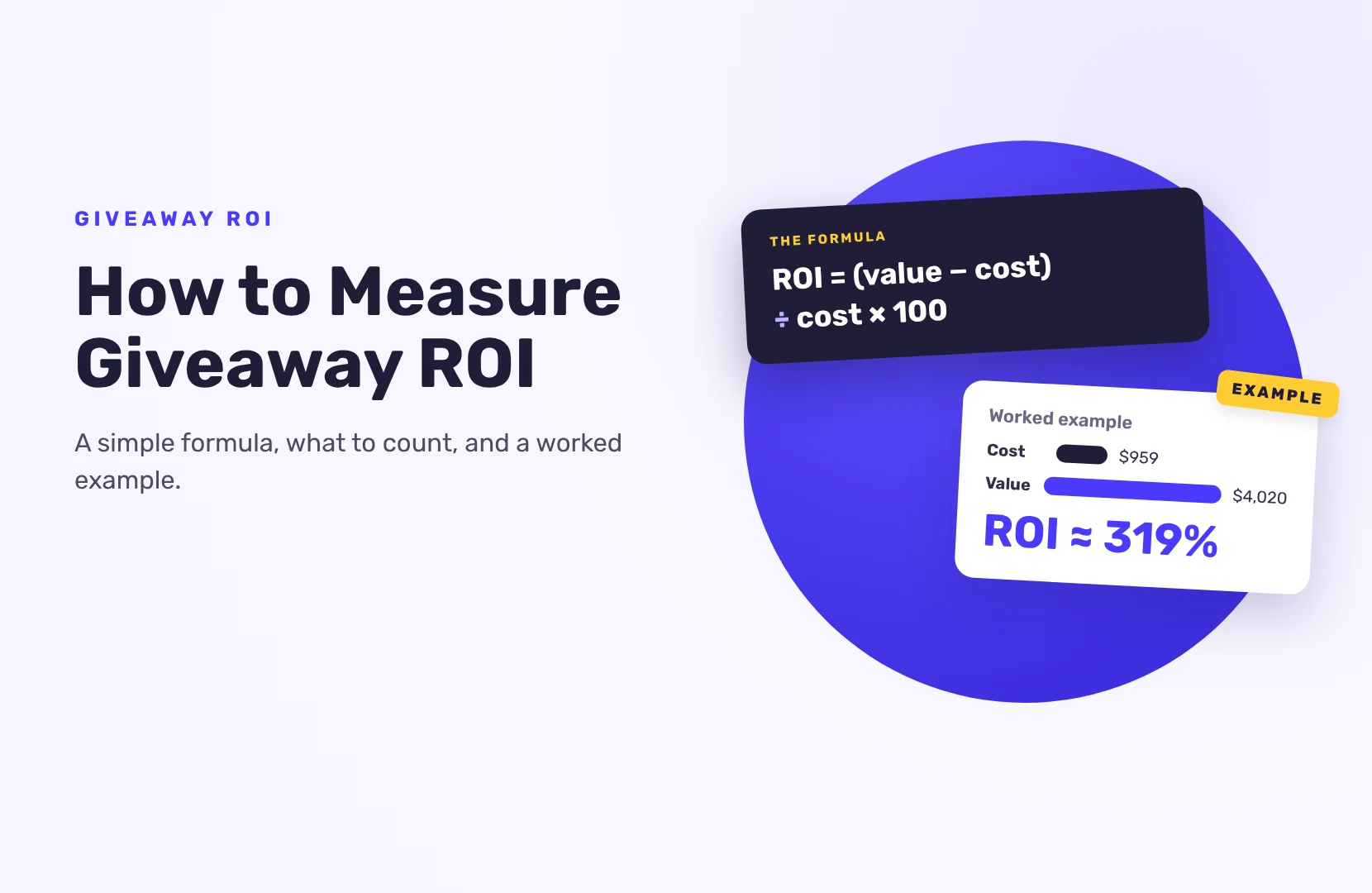
To measure giveaway ROI, add up everything the giveaway cost, put a money value on what it brought in (sales, email subscribers and other leads), and compare the two: ROI = (value gained – total cost) / total cost x 100. The hard part isn’t the formula. It’s tracking the value, so set up the tracking before the giveaway starts.
Here’s how to do each part, with a worked example at the end.
Step 1: Decide what “return” means for this giveaway
A giveaway can return several things, and they’re not equally easy to value. Pick the one that matches your goal and treat the rest as a bonus:
- Sales during or after the giveaway. Easiest to value.
- Email subscribers or leads. Valued with what a subscriber is worth to you (see step 3).
- Social followers. Real, but hard to put a dollar figure on. Report them alongside ROI, not inside it, unless you know what a follower is worth to you.
- Content (photos and videos from entrants). Valued by what it would cost to produce yourself.
Write down your starting numbers too: list size, follower count and weekly sales before the giveaway. Without a baseline you can’t tell what the giveaway added.
Step 2: Add up every cost
People tend to count only the prize. Include:
- The prize, at what it cost you (not the retail price, if it’s your own product)
- Shipping and taxes on the prize
- Your giveaway tool for the months you used it
- Paid promotion: ads, creator fees, boosted posts
- Discounts you gave entrants (coupon codes redeemed)
- Time: hours spent setting up, promoting and running it, at a fair hourly rate
Step 3: Put a value on each lead
An email subscriber is worth what, on average, a subscriber brings in. A simple way to estimate it:
- Take your email revenue over the last 12 months.
- Divide it by your average list size over that time.
That gives you a yearly value per subscriber. If you don’t have the data yet, use your average order value multiplied by the share of subscribers who usually buy, and say in your report that it’s an estimate.
Value only the leads you can use. Fake entries and people who unsubscribe straight away are worth nothing, which is why the next step matters.
Step 4: Clean the entry list
A big entry count full of bots and duplicate accounts makes ROI look better than it is. Before you count leads:
- Run the giveaway with fraud protection on: a security level of Standard or higher adds device fingerprinting, and disposable email addresses are blocked on every giveaway.
- Disqualify entries you know are fake, then export the list. Go to Manage Entries › Download CSV File › Download All Users. On the Free plan you can see the name and email of up to 10 entrants; paid plans download the full list.
- Count only entrants who were new to your list, not existing subscribers who entered again. Count only those who agreed to receive your emails, for example through a newsletter opt-in.
Step 5: Track where entries and sales come from
Set these up before launch. With SweepWidget:
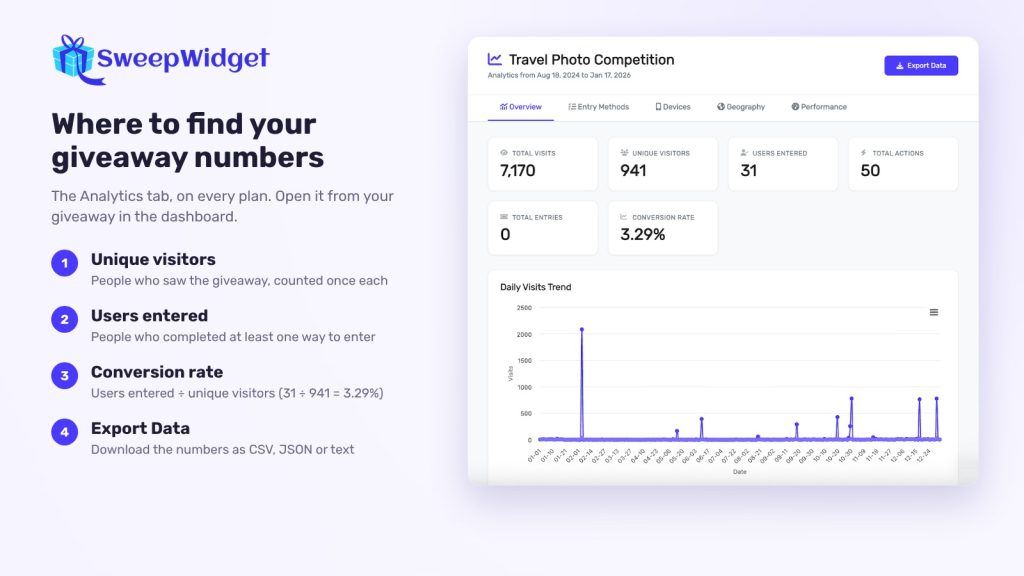
- Analytics tab (all plans). Total visits, unique visitors, users entered, total actions, total entries and conversion rate (users entered ÷ unique visitors), a daily visits chart, and tabs for entry methods, devices, geography and performance. You can export it as CSV, JSON or text.
- Google Analytics 4 (Pro plan and above). Add your Measurement ID under API Integrations. GA4 then records giveaway page views, logins, entries and each completed action, alongside the rest of your site traffic.
- Meta Pixel and TikTok Pixel (Pro plan and above). Entries and each completed entry method are sent as Lead (Meta) or SubmitForm (TikTok) events, so one entrant can fire several. Use them to compare ads that point at the giveaway and to retarget people who entered, and take your entrant count from the Analytics tab.
- Google Tag Manager (Business plan and above). Sends sw_ events to your dataLayer if you manage tracking in GTM.
- Email integration (Pro plan and above). New entrants go straight to your email tool through one of 30+ integrations, so you can tag them and track what they buy later.
For sales, use something you can count:
- A unique discount code for entrants. Instant coupons (Business plan and above) reveal a discount code once an entrant reaches the number of entries you set, so redemptions show up in your store.
- Purchase entries on Shopify or WooCommerce (Pro plan and above). Buyers earn entries for each dollar spent, and orders sync every 30 minutes, so the giveaway’s entry list shows who bought during it.
- UTM tags on every link you share, so your store analytics can tell which channel sent buyers.
Step 6: Measure twice: at the end and later
Measure once when the giveaway ends, and again 30 to 90 days later. Most of the value of new subscribers comes after the giveaway, when they open your emails and buy. Check:
- How many new subscribers are still on the list
- How many bought, and how much
- How many coupon codes were redeemed
Worked example
Example numbers, for illustration only.
A skincare brand gives away a bundle.
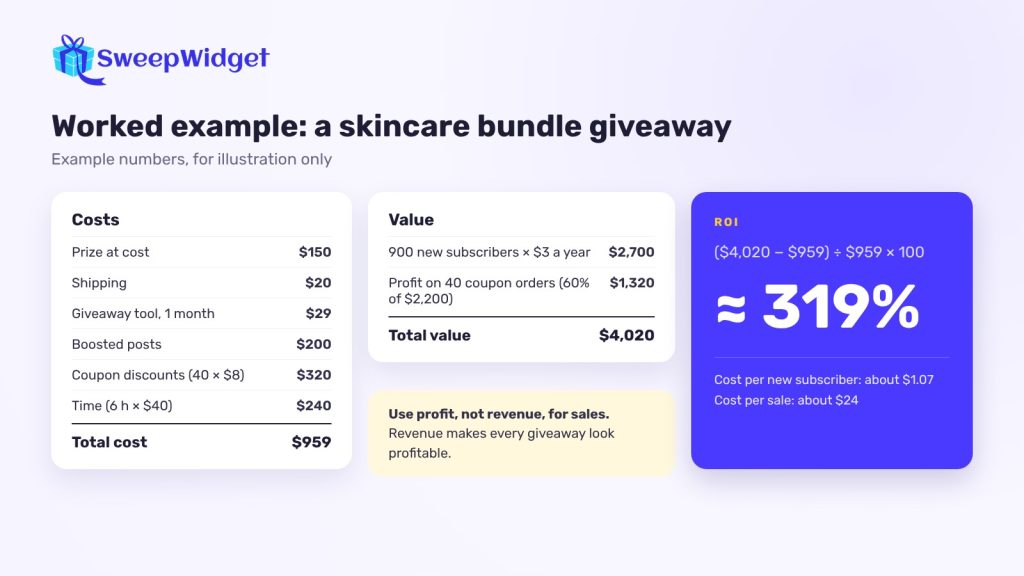
Costs
- Prize at cost: $150
- Shipping: $20
- Giveaway tool for one month: $29
- Boosted posts: $200
- Coupon discounts redeemed: 40 orders x $8 = $320
- Time: 6 hours x $40 = $240
- Total cost: $959
Value
- 1,200 entrants, 900 new to the list after removing fakes and existing subscribers
- Each subscriber is worth $3 a year to this brand: 900 x $3 = $2,700
- 40 coupon orders at $55 average before the discount = $2,200 in sales; at a 60% margin, that’s $1,320 in profit
- Total value: $4,020
ROI = ($4,020 – $959) / $959 x 100 = about 319%
Two other numbers worth reporting: cost per new subscriber ($959 / 900 = about $1.07) and cost per sale ($959 / 40 = about $24).
Use profit, not revenue, for sales. Using revenue makes every giveaway look profitable.
How to improve your next giveaway’s ROI
- Choose a prize only your customers want. Fewer entries, but more of them buy.
- Make one valuable action mandatory, such as joining your newsletter, and the rest optional.
- Check which entry methods worked. The Analytics tab shows which actions people completed; drop the ones nobody did.
- Follow up fast. Email all entrants within a day or two of the end with a thank-you and an offer.
- Keep fake entries out. They inflate your numbers and your costs. Our guide to blocking bots and fake entries covers the settings.
FAQ
Anything above 0% means it paid for itself. Compare it with what you get from other channels, like ads or email, for the same money.
Report follower growth next to your costs as cost per new follower. Only turn it into ROI if you know what a follower is worth to you, for example from past sales to followers.
Measure at the end, then again 30 to 90 days later. New subscribers often buy weeks after they enter.
Visits, unique visitors, entrants, conversion rate and the actions people completed. Add new subscribers, coupon redemptions and sales if those are your goals.
Yes. With SweepWidget’s GA4 integration (Pro plan and above), page views, entries and each completed action are recorded as events in your GA4 property.