How to Stop Fake Entries and Bots in Your Giveaway
Last updated on November 5th, 2026 at 09:29 pm
To stop fake entries in a giveaway, turn on your tool’s fraud checks before launch (a security level, VPN blocking and duplicate IP blocking), make people prove their email or phone number is real, cap what one person can earn from referrals, and check every winner before you announce them. No single setting catches everything. Layers do.
Here’s how each layer works in SweepWidget, and how to set them without blocking the real people you want.
Why giveaways attract fake entries
A free prize is worth gaming. The usual tricks:
- One person, many emails. The same person enters again with new addresses to multiply their odds.
- Bots. Scripts that fill in the entry form hundreds of times.
- Fake referrals. People “refer” themselves, or use made-up addresses, to collect referral entries.
- VPNs and proxies. Used to hide repeat entries or get around country limits.
- Throwaway emails. Disposable inboxes that exist for ten minutes.
Crypto giveaways and big cash prizes get hit hardest, but any giveaway with a public link will see some of this.
1. Pick the right security level
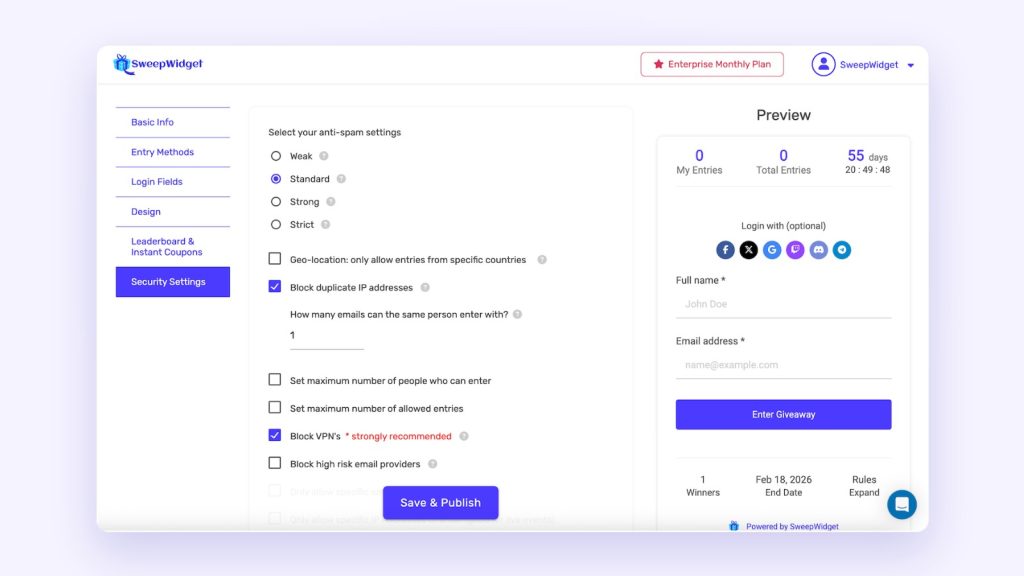
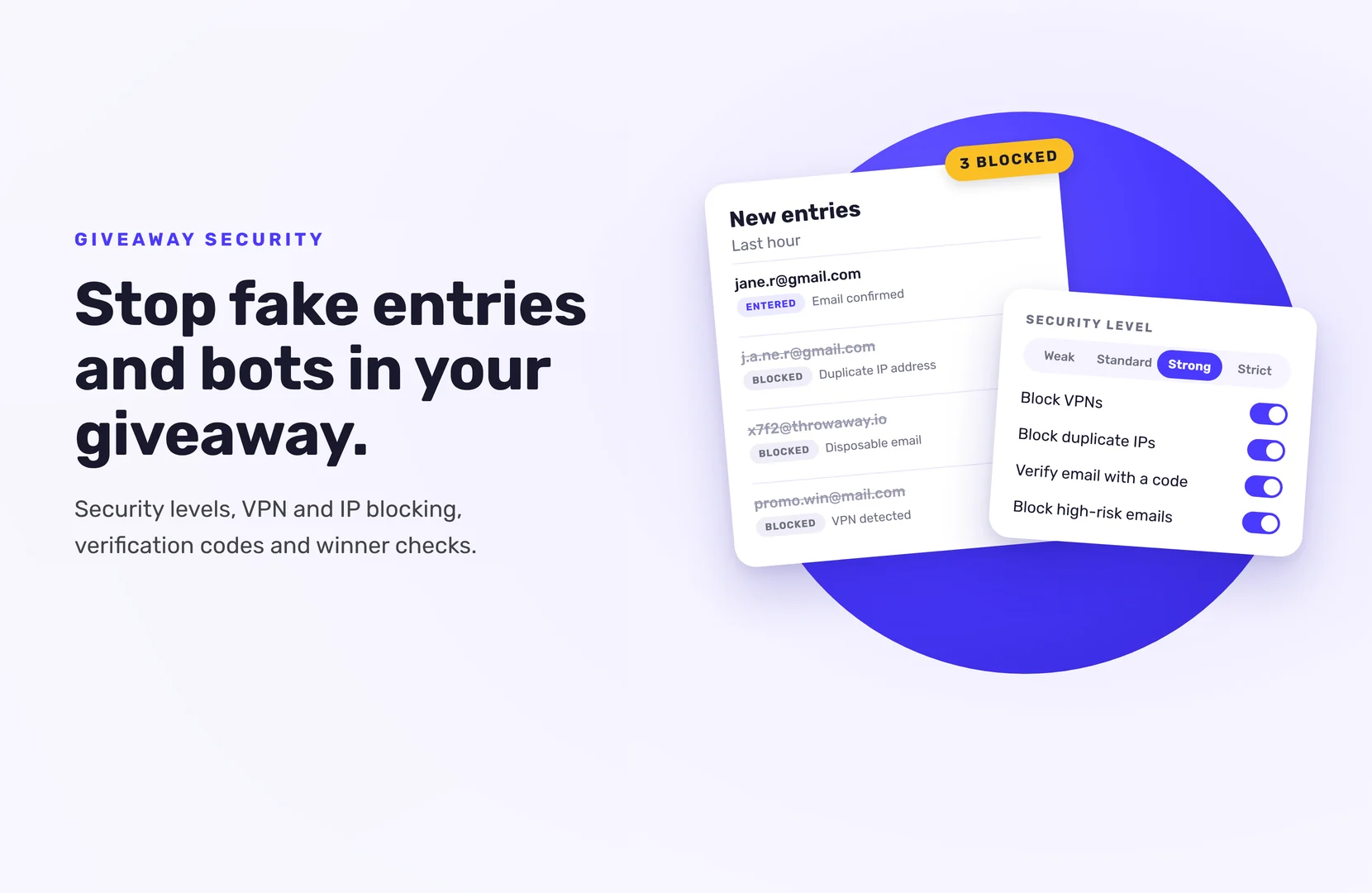
In SweepWidget, open your giveaway, go to Security Settings and choose one of four levels:
- Weak. The fewest checks. For internal contests or audiences you already trust.
- Standard. The default, and the right place to start for most giveaways. SweepWidget adds device fingerprinting to spot bots and repeat entries.
- Strong. Adds stricter device fingerprinting, which looks at the device and browser to spot bots, duplicate entries and fake friend referrals. Good for high-value prizes.
- Strict. The most rigorous scoring. It can flag some real people, so use it when security matters more than every single entry.
Start at Standard. If you see suspicious activity, raise it.
2. Block VPNs and repeat IP addresses
Two settings, both on Pro plan and up:
- Block VPNs. Entries from VPNs, proxies, Tor and known abusive IP addresses are blocked. SweepWidget recommends this for most giveaways, because a VPN is the easiest way around duplicate detection and country limits.
- Block duplicate IP addresses. Set how many emails can enter from one IP address. One or two suits most giveaways. Go higher if your audience shares networks, like offices, schools or households.
SweepWidget also blocks disposable email addresses on every giveaway and every plan. Its bot protection runs in the background, so there’s nothing for entrants to solve.
3. Make entrants prove their email or phone number
Fraud checks catch a lot. Verification closes the gap, because a fake address can’t receive a code.
- Email verification (Enterprise plan). After entering, people get a 4-digit code by email and type it in before the entry counts. You can edit the email and add your logo.
- SMS verification (Enterprise plan). People confirm a 4-digit code sent to their phone. It runs through your own Twilio account, so you’ll need a Twilio account, an auth token and a sending number.
Phone numbers are much harder to fake in bulk than email addresses, which makes SMS the strongest of the two. It also adds a step, so save it for prizes worth gaming.
4. Protect your referral entries
Refer-a-friend entries are great for reach and the first thing cheaters target. SweepWidget has a few protections on by default:
- No self-referrals. Nobody earns referral credit for their own account.
- Velocity limits. One person can earn credit for up to 25 referrals per hour and 200 per 24 hours. The friend still gets their entry.
On Business and above, you can add two more:
- Max allowed referrals, a cap on how many friends one person can refer.
- Friend entry requirement, which only credits the referrer once the friend has earned a minimum number of entries. A fake signup that does nothing earns the referrer nothing.
5. Use actions that platforms can confirm
Some social actions can be checked automatically, others can’t.
Discord, Twitch, Reddit, Bluesky and Telegram let SweepWidget confirm the action when someone signs in with their account. The entry only counts if the platform says it happened.
Instagram, Facebook and TikTok don’t allow any outside tool to check follows or likes, and SweepWidget takes YouTube subscribes and X follows on trust too. Entrants confirm their username, and you check the winner by hand.
Adding one confirmed action, like a Discord join or a Twitch follow (paid plans), gives you a stronger signal that entrants are real.
6. Watch your entries while it runs
Check your entries every day or two, especially after you promote. A sudden overnight spike can be real (someone shared it) or a bot attack. To tell which:
- Export your entries to CSV.
- Look for patterns: similar email addresses, the same IP, entries seconds apart.
- Disqualify the fake ones and raise your security level if needed.
Know a cheater’s email or IP? Add it to the Blocked Users List on the Manage Entries page (Pro plan and up). Wildcards work too, so *tempmail* blocks every address containing “tempmail”.
7. Check the winner before you announce
This is the last layer, and the one that matters most to your audience.
- Draw at random. You can require a minimum number of entries, so only people who completed several actions can win.
- Check the winner: real-looking email, actions done (especially Instagram, Facebook and TikTok ones), eligible under your rules.
- If something’s off, Disqualify them. They’re removed and can’t be drawn again. Then draw a replacement.
Don’t block your real entrants
Tighter isn’t always better. If real people tell you they’ve been marked as spam:
- Lower your security level by one step.
- Allow VPNs if your audience uses them for work or privacy.
- Raise the duplicate IP limit for shared networks.
- Add the person’s email or IP to the Allowed Users List (Pro plan and up). Allowed users skip the fraud checks, and the allowed list wins if someone is on both lists.
A good setup blocks the obvious fraud and lets everyone else enter in under a minute.
Want the strongest check on who’s entering? Compare the security features on each plan, or see how to require SMS phone verification.
FAQ
Layer your defenses: a Standard or higher security level, VPN blocking, duplicate IP blocking and email or SMS verification. Bots struggle most with codes they have to receive.
Blocking duplicate IP addresses stops most of it, and every security level from Standard up adds device fingerprinting. Email verification makes each extra address more work.
It can. The Strict level carries a higher false-positive risk. If real entrants are blocked, lower the level or add them to the Allowed Users List.
Referral rate limits and the block on self-referrals are on by default. On Business and above, you can also cap referrals per person and require referred friends to earn entries first.
Disqualify those users before you draw, or disqualify a winner who turns out to be fake and draw again.