
View Advanced Entry Method Options
The Advanced Options section in the Entry Methods tab gives you additional control over how participants interact with your giveaway. These options let you redirect users after completion, customize terminology, and control the entry flow.
How to Access Advanced Options
- Create or edit a giveaway
- Click on the Entry Methods tab
- Scroll down below your entry methods to find the Advanced options section
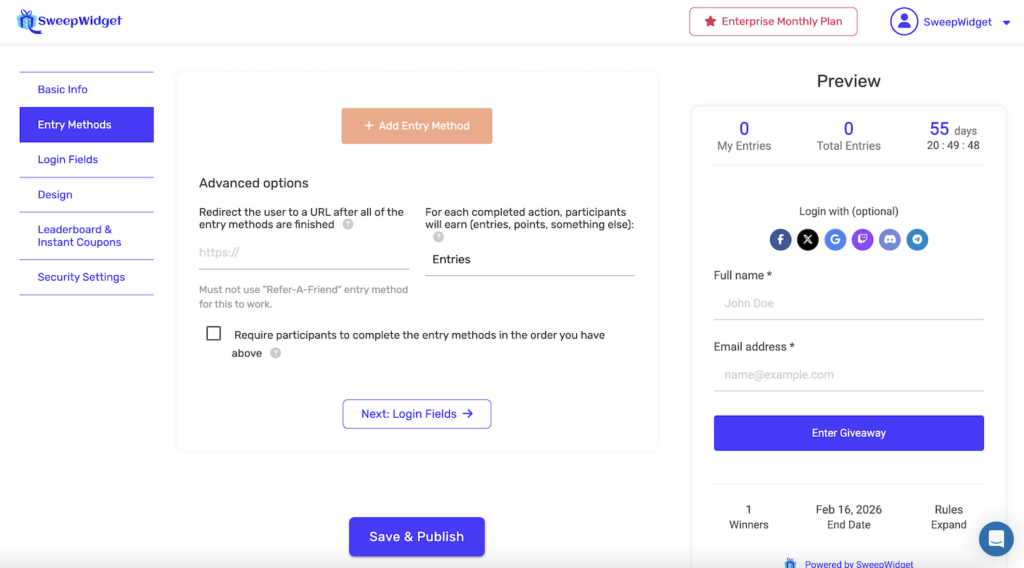
Available Advanced Options
1. Redirect URL After Completion
Plan Required: Pro or higher
Automatically redirect participants to a specific URL after they’ve completed all entry methods. This is useful for:
- Sending users to a thank you page
- Redirecting to your store or product page
- Directing participants to additional content or offers
- Sending users to a survey or feedback form
How to use:
- Enter the full URL in the text field (must include https://)
- When participants complete all available entry methods, they’ll be automatically redirected
Important: This feature does not work if you’re using the “Refer-A-Friend” entry method. The viral sharing feature requires users to stay on the giveaway page to share their referral link, so automatic redirection is disabled when this entry method is active.
2. Custom Entry Terminology (Entries, Points, or Custom)
Plan Required: Pro or higher
By default, participants earn “Entries” for completing actions. You can change this to match your brand or campaign style.
Available options:
- Entries (default) – Participants earn “1 Entry”, “5 Entries”, etc.
- Points – Participants earn “1 Point”, “5 Points”, etc.
- Something custom… – Define your own terminology
Using custom terminology:
When you select “Something custom…”, two additional fields appear:
- Singular version – What participants earn for 1 (e.g., “Ticket”, “Coin”, “Star”)
- Plural version – What participants earn for multiple (e.g., “Tickets”, “Coins”, “Stars”)
Examples of custom terminology:
| Singular | Plural | Display Example |
|---|---|---|
| Ticket | Tickets | “You earned 5 Tickets!” |
| Coin | Coins | “You earned 10 Coins!” |
| Star | Stars | “You earned 3 Stars!” |
| Chance | Chances | “You earned 1 Chance!” |
| Token | Tokens | “You earned 25 Tokens!” |
This terminology will appear throughout the giveaway widget wherever entry counts are displayed.
3. Sequential Entry Order
Plan Required: Business or higher
Force participants to complete entry methods in a specific sequence. When enabled, users must complete entry method #1 before they can access entry method #2, and so on.
How to enable:
- Check the box: “Require participants to complete the entry methods in the order you have above”
- Arrange your entry methods in the desired order using drag-and-drop
- Save your giveaway
Use cases:
- Lead generation funnel – Ensure users subscribe to your newsletter before unlocking social follow actions
- Step-by-step engagement – Guide users through a specific journey (e.g., “Visit our website” → “Read the article” → “Answer a question”)
- Mandatory first action – Make sure everyone completes a critical action (like joining your Discord) before accessing bonus entries
- Progressive disclosure – Reveal additional entry methods as rewards for completing earlier ones
How it works for participants:
- Entry methods they can’t access yet will appear locked/greyed out
- After completing an entry method, the next one becomes available
- Participants can see all entry methods but can only interact with unlocked ones
Plan Requirements Summary
| Feature | Required Plan |
|---|---|
| Redirect URL after completion | Pro |
| Custom entry terminology | Pro |
| Sequential entry order | Business |
Tips for Using Advanced Options
- Test your redirect URL – Make sure the destination page loads correctly before launching
- Keep custom terminology simple – Use familiar words that participants will understand
- Order matters for sequential mode – Put your most important entry method first since everyone must complete it
- Don’t combine redirect with Refer-A-Friend – Choose one or the other for your campaign
- Consider the user experience – Sequential mode can reduce completion rates, so use it strategically