
Choose From Giveaway Starter Templates
SweepWidget offers a library of pre-built starter templates to help you quickly create professional giveaways. Instead of starting from scratch, you can choose a template that matches your goals and customize it to fit your needs.
How to Access Starter Templates
To access the starter templates, click on Starter Templates in the left navigation bar of your SweepWidget account.
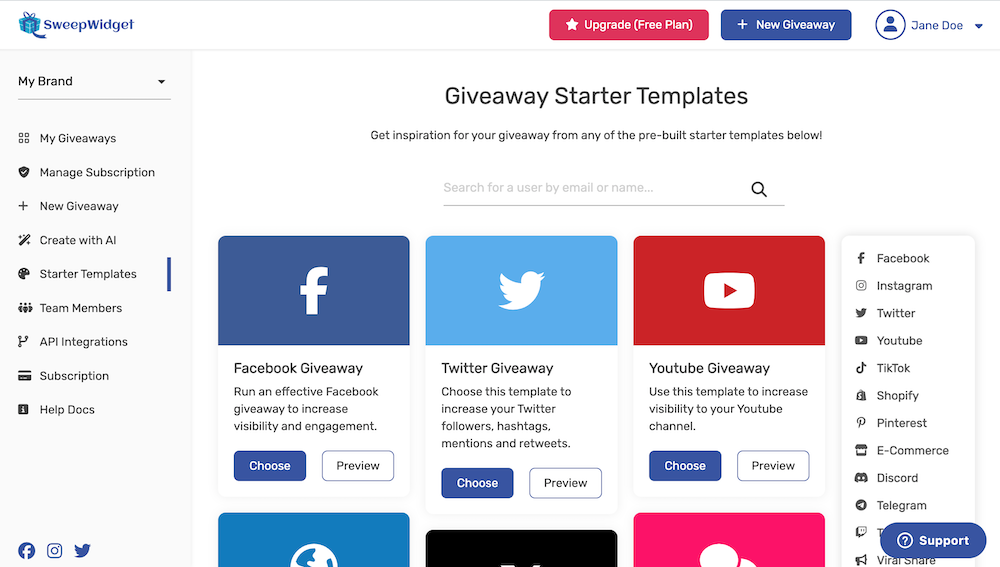
From here you can:
- Browse all templates – Scroll through the full library of pre-built giveaways
- Search by keyword – Use the search bar to find templates by name or category
- Filter by category – Click any category tag in the right sidebar to filter templates
- Preview templates – Click “Preview” to see a live example before choosing
Using a Starter Template
Once you find a template you like:
- Click the Choose button on the template card
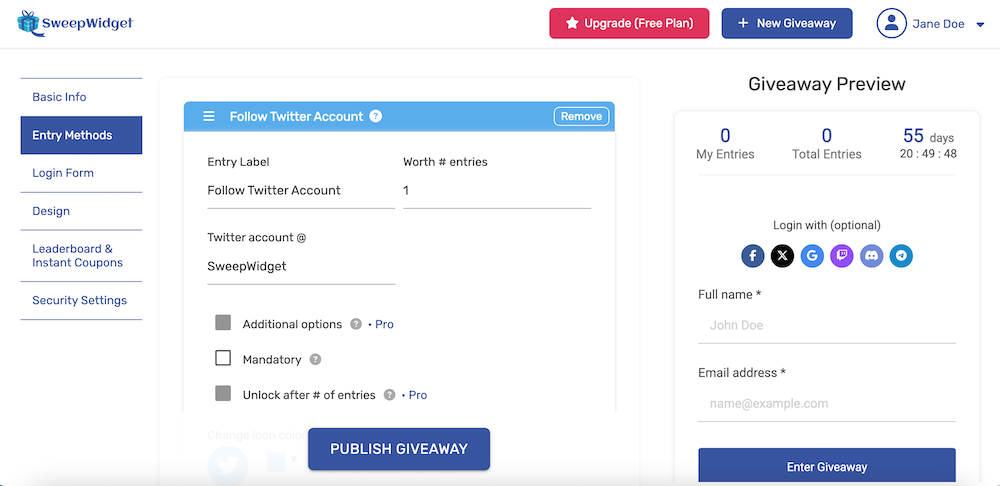
- You’ll be taken to the giveaway creation page with all entry methods pre-filled
- Customize the title, description, dates, prizes, and any other settings
- Modify or remove entry methods as needed
- Save and publish your giveaway
Template Categories
Templates are organized into categories to help you find the right one for your campaign. Here are all the available categories:
Social Media Growth
Grow your following on popular social platforms:
- Facebook – Page likes, post engagement, shares, and comments
- Instagram – Follows, post likes, reels views, and story engagement
- Twitter/X – Follows, retweets, likes, and replies
- YouTube – Channel subscriptions, video views, likes, and comments
- TikTok – Follows, video views, likes, and shares
- Pinterest – Follows and pin saves
- LinkedIn – Company page follows and post engagement
- Reddit – Subreddit joins and post upvotes
- Medium – Article reads and follows
Community Building
Build engaged communities on messaging platforms:
- Discord – Server joins and role assignments
- Telegram – Channel and group joins
- Twitch – Channel follows and stream engagement
E-Commerce & Sales
Drive traffic and sales to your online store:
- Shopify – Store visits, product views, and purchases (special templates for Shopify app users)
- WooCommerce – WordPress store giveaways
- E-Commerce – General online store templates
- eBay – Listing views and store follows
- Etsy – Shop favorites and listing engagement
Crypto & Web3
Templates designed for blockchain and crypto projects:
- Crypto – General cryptocurrency giveaways with wallet verification
- NFT – NFT collection launches and community building
- Airdrop – Token airdrops with multi-task entry requirements
Engagement Features
Templates that use advanced SweepWidget features:
- Viral Share – Referral-based giveaways where users earn extra entries by sharing
- Leaderboard – Competitive giveaways with public leaderboards showing top participants
- Milestones – Unlock bonus prizes when the giveaway reaches entry milestones
- Instant Coupons – Automatically deliver discount codes when users enter
- Instant Prizes – Immediately award prizes to qualifying entries
Website & Content
Drive traffic and engagement to your website:
- Website Traffic – Increase visits to specific pages on your site
- Blog Comments – Encourage comments on blog posts
- App Download – Drive installs of your mobile app
User-Generated Content
Collect content from your audience:
- Upload Media – Photo and video submission contests
- Custom Form – Collect custom information through form fields
- Quiz – Knowledge-based entry with quiz questions
Events & Memberships
Promote events and membership platforms:
- EventBrite – Event registration and attendance
- Patreon – Membership subscriptions and creator support
Template Plan Requirements
Some templates require specific SweepWidget plans:
- Free Templates – Available to all users, including those on the Free plan
- Pro Plan Templates – Require a Pro plan subscription (indicated with a “Pro Plan” badge)
- Business Plan Templates – Require a Business plan subscription (indicated with a “Business Plan” badge)
Templates that require a higher plan will show a lock icon. To use them, you’ll need to upgrade your plan.
Customizing Templates
After selecting a template, you have full control to customize every aspect:
- Entry Methods – Add, remove, or modify any entry method
- Points & Entries – Adjust how many entries each action is worth
- Mandatory vs. Optional – Change which entries are required vs. bonus
- Design – Customize colors, fonts, images, and layout
- Dates & Rules – Set your own start/end dates, rules, and terms
- Prizes – Define your own prizes and winner counts
Templates are just a starting point – feel free to modify them extensively to match your specific campaign goals.
Starting from Scratch
If you prefer to build your giveaway from the ground up, you can always start with a blank canvas. Simply click New Giveaway in the left navigation instead of choosing a template. This gives you complete control to add only the entry methods you need.
Tips for Choosing the Right Template
- Match your primary goal – Choose a template that focuses on your main objective (followers, sales, engagement, etc.)
- Consider your audience – Pick platforms where your target audience is most active
- Start simple – Don’t overwhelm participants with too many entry methods; 3-5 is often ideal
- Preview first – Always preview a template before choosing to make sure it fits your vision
- Mix and match – Use a template as a base, then add entry methods from other categories
Ready to get started? Browse the starter templates library and launch your next giveaway in minutes!